‏إظهار الرسائل ذات التسميات web developing. إظهار كافة الرسائل

الأربعاء، 30 أغسطس 2017

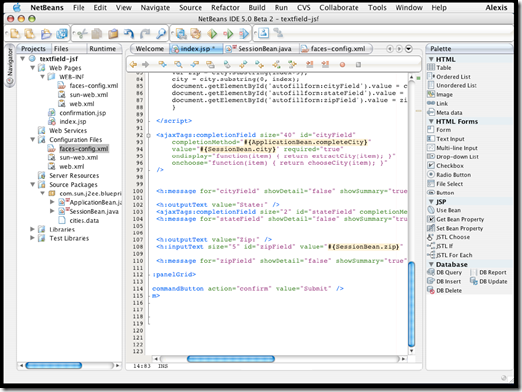
NetBeans

NetBeans - Development Simplified

A free, open-source Integrated Development Environment for software developers. You get all the tools you need to create professional desktop, enterprise, web, and mobile applications with the Java language, C/C++, and even dynamic languages such as PHP, JavaScript, Groovy, and Ruby. NetBeans IDE is easy to install and use straight out of the box and runs on many platforms including Windows, Linux, Mac OS X and Solaris.

NetBeans logo                           NB DVD Order logo

The NetBeans IDE 6.5 provides several new features and enhancements, such as rich PHP, JavaScript and Ajax editing features, improved support for using the Hibernate web framework and the Java Persistence API, and tighter GlassFish v3 and MySQL integration.

NetBeans01

NetBeans Supported Technologies

Ajax | C/C++ | Databases | Debugger | Desktop | Editor | Groovy | GUI Builder | Java EE | JavaFX | Java ME | Java SE | JavaScript | Mobile | PHP | Profiler | Python | Refactor | REST | Rich Client Platform | Ruby | SOA | SOAP | UML | Web | WSDL | XML

download

Download Java SE and NetBeans Cobundle (JDK 6u13 and NB 6.5.1) for Windows, Multi-language          

- JMD Computer

* if Link is Broken, fill free form click here with Link Details.

Source:- http://www.netbeans.org/features/    or    http://www.netbeans.org/

الثلاثاء، 29 أغسطس 2017

Modix HD3510: Fully Adequate DVD Player Replacement

At first glance, the white box of the Modix player looks like a normal external hard drive case. On the front is a large display and lots of function buttons, while the A/V and USB ports can be found on the back, where you can also attach an external power supply. Once you turn on the device, a menu structure will appear on the hard-to-read display. You can navigate either with the remote control or using the many buttons on the front.

Package information , Package Contents


The player can be controlled without a remote control, using the buttons

The remote control is pleasant to hold

Some buttons on the remote control have no functions

Source:- http://www.tomshardware.com/reviews/hard-disk-drive-video-players-hit-mainstream,1107-10.html

الأحد، 27 أغسطس 2017

Tack Ownership of your website

Welcome to Site Grinder 2

                                A brilliant idea in web design.image
Right inside Photoshop, create stunning CSS-rich, standards compliant websites  using your own designs, and without writing a single line of code. SiteGrinder2 does it all in just minutes, and even lets you build automated photo galleries, Flash slideshows, CSS-driven menus, and so much more, into your website. Best of all, your gorgeous designs remain looking just as you created them ... gorgeous. Here’s how it works.

Challenge: Beautifully Designed Websites Are Difficult To Create

image It’s not easy to actually build a beautiful website that matches a design created in an application like Photoshop. Photoshop gives an artist total design freedom, but that’s not the case with Web code. The Web uses many confusing technologies, none of which place emphasis on design integrity. As a result, those who are good at Photoshop struggle with creating WebPages, and they don’t want to spend months or years learning confusing programming code like XHTML, CSS, JavaScript, and more, just to create a halfway decent looking website.

Solution: Create WebPages In Photoshop!

imageSite Grinder 2 turns Adobe Photoshop into an easy-to-use and powerful website  design and production tool. It’s true! In fact, a Site Grinder 2-equipped designer with no HTML expertise needs only their Photoshop skills to go from design concept to full deployment of a professional, standards-compliant website in just minutes with no programming whatsoever … and they do it all from within Photoshop. Site Grinder 2 takes care of everything, even ensuring cross-platform browser compatibility. Best of all, pages created with Site Grinder 2 retain the exact look and layout of the parent Photoshop file from which they were created.

Amazing!

It’s Super Easy: Name Some Layers And Create A Websiteimage
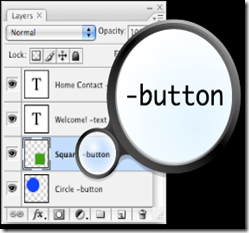
You know Photoshop. Site Grinder 2 knows CSS, HTML, Web image formats, and  much more. All you have to do is tell Site Grinder 2 about special layers, like buttons, by adding “Hints” to your layer names. To the right you see the words “button”, “rollover”, and “popup” in the layer names.

Those are Hints, and they’re the only things required to create a website that’s as gorgeous as your design. Once you’ve added a few Hints to your layer names, just launch the Site Grinder 2 plug-in and it’ll build your page in minutes with just a click of the mouse.

The Results Speak For Themselves
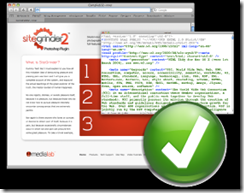
image There’s nothing complicated about it. Just create your web design in Photoshop, add Hints to your layer names, and before you know it, you have a fully functional, CSS-rich, standards compliant webpage. Site Grinder 2 does all the complicated stuff for you with just a mouse click. You can even add Flash animations, slideshows, and much more to your WebPages. Doing so is a breeze. And the best part is that your gorgeous designs remain looking just as you created them … gorgeous.


startpageBottom_en

- JMD Computer

* if Link is Broken, fill free form click here with Link Details.

Source:- http://www.medialab.com/sitegrinder/overview.php

الجمعة، 18 أغسطس 2017

Download Remoteus Helpdesk

WHY REMOTEUS

Provide remote support everywhere securely and safely over the Internet.
Reach customers behind firewalls and NAT addresses instantly without programming or configuring anything.

Your customer only has to push one button in the Customer's Program to initiate the remote support connection.

book

Also the Helpdesk Program follows with you everywhere. You are not tied to providing remote support from your own network only!

Remoteus2008

You only need to pay for the maximum number of concurrent remote sessions you would like to be able to build between you and your customers. You can have both the Helpdesk and the customer's programs installed on any number of PCs you like.

Give instant remote support to your customers or remotely demo your own new software.

Make your and your customers' business easier.

Here is link to download Remoteus Helpdesk:

download

http://www.remoteus.net/download/demo/eng/remoteus-helpdesk.exe

Here is link to download Remoteus Customer´s program:

download

http://www.remoteus.net/download/demo/eng/remoteus2008.exe

Here is link to download Remoteus Customer´s program, that requires only guest rights for installation

download

http://www.remoteus.net/remoteus2008/download/temporary/eng/remoteus2008.exe

- JMD Computer

* if Link is Broken, fill free form click here with Link Details.

Source:- http://www.remoteus.net/pages/english/index.php?sivu=why

الخميس، 10 أغسطس 2017

How Secure is Your Surfing - Is Your Browsing Encrypted?

So have you actually every thought about how secure your surfing is? Do you know if your surfing is encrypted, you probably know that if you see that little padlock that you have some sort of security, but how much.   Well the truth is that there is a basic insecurity with browsing the web which is because it was developed for speed not security.

The majority of our web browsing happens through something called HTTP (Hyper Text Transport Protocol), this is a language used to request and receive information through our web browsers. It is an incredibly efficient language and it allows us to send and receive information quickly with little to no overhead.   It is one if the reasons behind the success of the internet, after all for the first years of the life of the internet, people were using very slow connections.  My first modem was a 14.4k model, it would probably take about 10 minutes to load the average web page nowadays but it was reasonably responsive.

HTTP is actually a clear text protocol so it doesn't encrypt, secure or protect your data in any way, it is all transported in clear text.  Anyone one the same network as you can clearly read all the information that passes through HTTP, web sites, logins, password you name it's all visible in logs, in the ether and across the wires.  It's not HTTP's fault though it was never designed to provide any security.

Of course if you see a little padlock on your browser somewhere you'll be a little safer this is when your surfing is protected and encrypted.  This is the sign you're using HTTPS which is a secure version of the protocol, you'll notice in the address bar your HTTP turns to HTTPS on a secure site.   Of course you can't choose when to use HTTPS you are dependent on the server you visit, which is unfortunately the case with most security on the internet - you are reliant on other people.

Always remember the trail you leave behind you when you are surfing, everyone can be traced back to their IP address. Your ISP logs your every web site visited, picture downloaded and movie watched.  Combine this with the servers you visit logging your address and all the other places your browsing is logged and you can see the potential for security problems.

So remember without the padlock you're using HTTP and so your connection, account names and passwords are not encrypted and are readable by anyone.  Never enter sensitive or confidential information on any web site which is not secured.

To see which software I use which offers a full encryption, private proxies and total privacy check out the links below.

Online Surf Protection

Try the new free demo of Identity Cloaked on the link below.

Anonymous Surfing Demo

Take care and stay safe.
Jim

Article Source: http://EzineArticles.com/?expert=Jim_Rjindael