Consumer
Adobe Reader software is the global standard for electronic document sharing. It is the only PDF file viewer that can open and interact with all PDF documents. Use Adobe Reader to view, search, digitally sign, verify, print, and collaborate on Adobe PDF files.
- Download Adobe Reader
- Acrobat and Adobe Reader feature
comparison - Adobe Reader support
- User to User Forums
- Third-party plug-ins
- Adobe Reader and accessibility
- Obtaining older versions of Adobe Reader
- Adobe Reader Weblog
- Try Adobe Reader with Acrobat.com (beta)
Enterprise
Deploy, maintain, and support Adobe Reader across your organization. Corporations, government agencies, and educational institutions can distribute Adobe Reader internally on an intranet site or a local network.
- Apply for a distribution license
- Solutions for IT
- Customize the Reader installer
- Enterprise support programs
- Security
- Accessibility
- Obtaining older versions of Adobe Reader
- Adobe Reader Weblog
- Adobe Reader for the enterprise
Partners
Interested in an OEM relationship with Adobe and Adobe Reader? Adobe Reader is available as an OEM through our rich partner network.
- Apply for a distribution license
- Customize the Reader installer
- Support programs
- Adobe Reader logos and artwork
- Guidelines for logo use
- Adobe Reader Weblog
Developers
Interested in developing a plug-in for Adobe Reader? Freely distributed Adobe Reader is widely available; more than 500 million copies have been distributed worldwide since 1993. To build a Reader plug-in, you must first apply for an Integration Key License Agreement.
- Getting started as an Adobe Reader plug-in developer (PDF, 4.6M)
- Adobe Reader Developer Center
- Obtain a Reader Integration Key License Agreement
- Third-party plug-ins
- Open source initiatives at Adobe
- PDF Reference
- Adobe Reader JavaScript specification (PDF, 953k)
- Adobe Solutions Network (ASN)
- Adobe Reader support programs
- Adobe Reader Weblog


- JMD Computer Keep Comment
* if Link is Broken, fill free form click here with Link Details.
Source: http://www.adobe.com/products/reader/


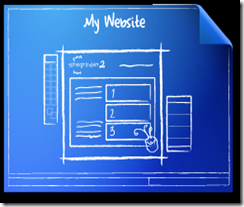 It’s not easy to actually build a beautiful website that matches a design created in an application like Photoshop. Photoshop gives an artist total design freedom, but that’s not the case with Web code. The Web uses many confusing technologies, none of which place emphasis on design integrity. As a result, those who are good at Photoshop struggle with creating WebPages, and they don’t want to spend months or years learning confusing programming code like XHTML, CSS, JavaScript, and more, just to create a halfway decent looking website.
 Site Grinder 2 turns Adobe Photoshop into an easy-to-use and powerful website design and production tool. It’s true! In fact, a Site Grinder 2-equipped designer with no HTML expertise needs only their Photoshop skills to go from design concept to full deployment of a professional, standards-compliant website in just minutes with no programming whatsoever … and they do it all from within Photoshop. Site Grinder 2 takes care of everything, even ensuring cross-platform browser compatibility. Best of all, pages created with Site Grinder 2 retain the exact look and layout of the parent Photoshop file from which they were created.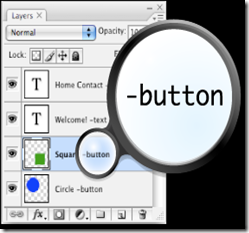
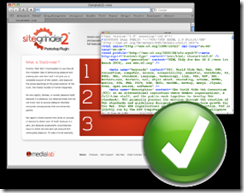 There’s nothing complicated about it. Just create your web design in Photoshop, add Hints to your layer names, and before you know it, you have a fully functional, CSS-rich, standards compliant webpage. Site Grinder 2 does all the complicated stuff for you with just a mouse click. You can even add Flash animations, slideshows, and much more to your WebPages. Doing so is a breeze. And the best part is that your gorgeous designs remain looking just as you created them … gorgeous.