‏إظهار الرسائل ذات التسميات Input-Output. إظهار كافة الرسائل

الأربعاء، 30 أغسطس 2017

The Ethical Hacker

Welcome to the unique confluence of hackers , crackers and security professionals on the world wide web.


This is your complete resource for internet security and ethical hacking.


 -: The Ethical Hacker :-hack
Most people think that hackers are computer criminals.
They fail to recognize the fact that criminals and hackers are two totally different things.
Media is responsible for this.
Hackers in reality are actually good and extremely intelligent people who by using their knowledge in a constructive manner help organizations, companies, government, etc. to secure documents and secret information on the internet.

Source:- http://www.insecure.in/

Windows-XP Password Cracking

Here we use the tool "Cain and Abel" for cracking passwords of any local user/administrator.


First download cain and abel from "http://www.oxid.it/cain.html" and install it on your system.


Make sure that you have disabled the antivirus/firewall running on your system before installing and throughout this process.


Two most effective techniques used here are "Brute-Force" and "Cryptanalysis".
Brute-Force:- As this techniques takes more time to complete, the attacker prefer this technique only when there is a hope that the password contain same type of characters or may be two. i.e only loweralpha, only alpha, only numeric or may be loweralpha-numeric, also it should contain less than 7 characters. Otherwise it takes more time to crack password, which may be the mixture of all types of characters along with special symbols.


The step-by-step explaination for this technique is given below-


1) Open the tool "Cain and Abel"  

2) Go into the category "Cracker"      it displays all sub-categories under "Cracker" in left panel.

3) Select "LM & NTLM Hashes" from left panel and then click on      symbol, you will be greeted by a window as shown.

4) Check "import hashes from local system" and then click "Next". This shows all the active accounts on local system like administrator, guest, etc. along with LM and NT hashed values of their respective passwords, as shown below.

5) Right clicking on any username shows all available options using which we can crack it's password.

6) Here we select "Brute-Force Attack" and then "NTLM Hashes", since windows uses NTLM hashes to store local users' passwords.
7) You will be greeted by a window where you can modify properties for brute-force attack such as password length, character set, etc.

8) Click on "Start" button.
9) On completion it will reveal the exact password.


Cryptanalisys :- Basically, Cryptanalisys means Operations performed in converting encrypted messages to plain text without initial knowledge of the crypto-algorithm and/or key employed in the encryption.


This is the fastest technique of password cracking possible due to "Rainbow Tables".


A rainbow table is a file that is used to lookup an unknown plaintext from a known hash for an algorithm that does not usually permit this operation.


Steps 1 to 4 i.e upto importing hashes from local system, are similar to previous technique (i.e brute-force). The steps coming after that are as follows-


5) Here, select "cryptanalisys attack" then "NTLM hashes" and then select "via rainbow tables". Here we can choose either OphCrack or RainbowCrack formats of tables. The rainbow tables are available free to download on internet.


Due to large file size of rainbow tables (350MB - 3GB); instead of downloading we can also create at own just by downloading rainbow table generator (winrtgen.zip of 181KB) free download at "http://www.oxid.it/downloads/winrtgen.zip"

6) Click on "Add Table"

7) Browse for the location of rainbow table on your system, select proper table and click "open".

8) Select the loaded table and then click on "Start" button.

9) On completetion it will show the exact password.


To learn windows password cracking techniques properly, one must understand "LM" & "NTLM" algorithms, SAM File, Dumping NTLM hashes from local SAM, Rainbow Tables, etc.......!

Source:- http://www.insecure.in/winxp_passcrack.asp

UltraISO Premium

UltraISO can extract, create, edit, and convert CD/DVD image files. It can directly edit an ISO file, make ISO images from CD/DVD-ROMs, create a new ISO from files and folders on your computer, and make bootable CDs and DVDs. In addition, UltraISO can convert nearly all known CD and DVD image formats to ISO, BIN/CUE, Nero (NRG), Alcohol 120% (MDS/MDF), and CloneCD (CCD/IMG/SUB) formats, as well as burn CD/DVD images directly with built-in burning engine and emulate ISO images with up to 8 virtual CD/DVD drives.

Version 9.3.3.2685 can view and extract files from XBOX360 ISO images, mount UDF DVD images on Windows Vista and Windows 7 Beta 1, and save newly detected media capacity.

download

- JMD Computer

* if Link is Broken, fill free form click here with Link Details.

Source:- http://download.cnet.com/UltraISO-Premium/3000-2646_4-10177302.html

NetBeans

NetBeans - Development Simplified

A free, open-source Integrated Development Environment for software developers. You get all the tools you need to create professional desktop, enterprise, web, and mobile applications with the Java language, C/C++, and even dynamic languages such as PHP, JavaScript, Groovy, and Ruby. NetBeans IDE is easy to install and use straight out of the box and runs on many platforms including Windows, Linux, Mac OS X and Solaris.

NetBeans logo                           NB DVD Order logo

The NetBeans IDE 6.5 provides several new features and enhancements, such as rich PHP, JavaScript and Ajax editing features, improved support for using the Hibernate web framework and the Java Persistence API, and tighter GlassFish v3 and MySQL integration.

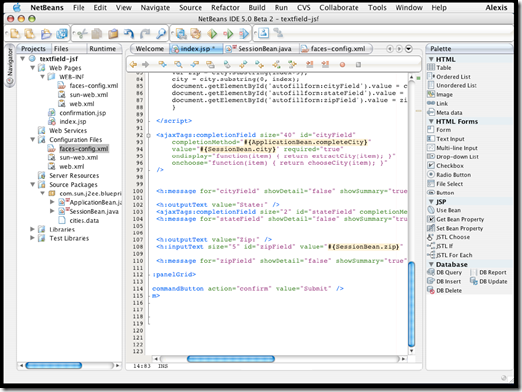
NetBeans01

NetBeans Supported Technologies

Ajax | C/C++ | Databases | Debugger | Desktop | Editor | Groovy | GUI Builder | Java EE | JavaFX | Java ME | Java SE | JavaScript | Mobile | PHP | Profiler | Python | Refactor | REST | Rich Client Platform | Ruby | SOA | SOAP | UML | Web | WSDL | XML

download

Download Java SE and NetBeans Cobundle (JDK 6u13 and NB 6.5.1) for Windows, Multi-language          

- JMD Computer

* if Link is Broken, fill free form click here with Link Details.

Source:- http://www.netbeans.org/features/    or    http://www.netbeans.org/

Magic ISO

Quickly create an new ISO file or an new CD/DVD

1. Click menu "Files" ->"New" to choose which type of ISO image you want to create

Data CD/DVD image:  The new ISO image contains two file systems  - ISO 9660 and Joliet. This ISO image or CD/DVD burnt with this ISO image can be read on Microsoft Windows.
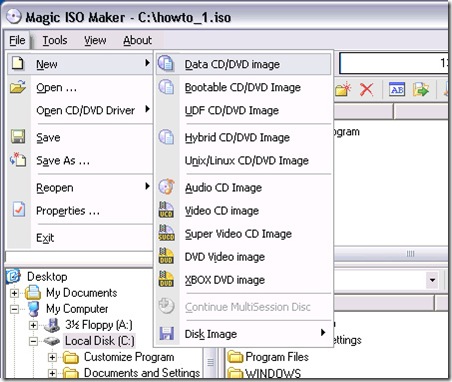
howto_1

Bootable CD/DVD image:  Create a bootable ISO image with choosing bootable image file that can be get from bootable floppy disk or another bootable ISO image. The new ISO image contains two file systems  - ISO 9660 and Joliet.  This ISO image or CD/DVD burnt with this ISO image can be read on Microsoft Windows.

UDF CD/DVD image:  Create UDF-ONLY ISO image.

Hybrid CD/DVD image: The new ISO image contains four file systems  - ISO 9660,  Joliet, UDF and Apple HFS+. The ISO image or CD/DVD burnt with this ISO image can be read on Microsoft Windows and Mac OS X.

Unix/Linux CD/DVD image: The new ISO image contains three files systems - ISO 9660, Joliet and RockRidge. The ISO image or CD/DVD burnt with this ISO image can be read on Microsoft Windows ,Linux and Unix.

2. Dragging files or directories from Local Browser  into ISO Panel. or click the button " or to add files or directories.

3. Click to create an new folder. Then enter the folder name.

4. Click to delete files or folders.

5. Press F2 or click to rename file name, folder name or volume name.

>>For creating an new ISO image.

6. Click to save in ISO image.

>>For creating an new CD or DVD.

6. Click to burn CD/DVD on-the-fly.

7. Choose your CD/DVD recorder, Choose write speed. Important: you must remember to clear the "Finalize CD" checkbox if you need to write data onto this CD or DVD later. With a Multisession CD or DVD, this checkbox is only checked for the last session of the CD or DVD. This setting write protects the CD or DVD and no further writing is possible.

8. Click "Burn it!" button to start the burn process.

startpageBottom_en                                download

Version - 5.5(build 274)                                                    Mirror Link

Using MagicISO to edit ISO file

1. Click to open ISO file or choose File menu and Click Open Command.

2. Dragging files or directories from Local Browser  into ISO Panel. or click the button " or to add files or directories.

3. Click to create an new folder. Then enter the folder name.

4. Click to delete files or folders.

5. Press F2 or click to rename file name, folder name or volume name.

6. Click to save in ISO image.

>>For creating an new CD.

6. Click to burn CD/DVD on-the-fly.

7. Choose your CD/DVD recorder, Choose write speed. Important: you must remember to clear the "Finalize CD" checkbox if you need to write data onto this CD or DVD later. With a Multisession CD or DVD, this checkbox is only checked for the last session of the CD or DVD. This setting write protects the CD or DVD and no further writing is possible.

8. Click "Burn it!" button to start the burn process.

 startpageBottom_en                                download

Version - 5.5(build 274)                                                    Mirror Link

Make ISO from CD/DVD-ROM

1. Click Menu "Tools"->"Make ISO from CD/DVD-ROM"

2.  Choose "Source CD/DVD-ROM"

3. Enter output file name

4. Choose output format for your CD/DVD.

Standard ISO image file (.ISO): It is used for All kind of DVD Disc and Data CD with single track.

BIN image file (.BIN/.CUE): It is used for Audio CD, Video CD, Super Video CD and all CD with single session.

NRG image file (.NRG): It is used for All kind of CD (include Audio CD, Video CD, Super Video CD and Data CD etc.)

Universal Image Format ( *.UIF): It is used for all kind of CD and DVD. It is strongly recommended for backuping your CD or DVD. Read here to learn more.

5. If you choose "Universal Image Format(*.UIF)" as output format, you can enter password for protecting your image file.

6. Click "Ok" to process.

 startpageBottom_en                                download

Version - 5.5(build 274)                                                    Mirror Link

Extract boot image from CD/DVD-ROM

1. Click Menu "Tools"->"Make ISO from CD/DVD-ROM"

2.  Choose "Source CD/DVD-ROM"

3. Enter output file name.

4. Check "Export Boot Image".

5. Click Ok button to process.

Make boot image from floppy disk

1. Click menu "Tools"->" Make boot image from floppy disk"

2. Enter the name of bootable image file to save.

Make bootable ISO image

1.  Open an ISO image.

2. Click to set boot image file.

3. Click button to save ISO file.

Convert CD/DVD image

1.  Click menu "Tools"->"Convert ..."

2. Enter source file name,   Choose output format, Enter output file

3. Click "Convert" Click here to learn about how to convert .DMG to ISO image.

Burn CD/DVD with CD/DVD image file

1. Click to open "Burn CD!" Dialog

2. Choose CD/DVD-Writer

3. Enter CD/DVD image filename

4. Choose writing speed.

5. Click "Burn it!"

 startpageBottom_en                                download

Version - 5.5(build 274)                                                    Mirror Link

- JMD Computer

* if Link is Broken, fill free form click here with Link Details.

Source:- http://www.magiciso.com/howto/howto.htm