الخميس، 21 مايو 2015

APP | 4.4/5.0 | Eleven Music Player (CyanogenMod)

Experimente o maravilhoso Player nativo da CyanogenMod 12 no seu Android!


Compatível com o Android KitKat e Lollipop

Características:

- Material Design
- Leve
- Rápido

Screenshots:


Downloads:

Eleven Music Player
Para Android 4.4

Eleven Music Player
Para Android 5.0


Via: XDA

الأربعاء، 20 مايو 2015

Android L Release Delayed Due To Zenfone Verification Process Problem


Sad news for ASUS Zenfone 4, Zenfone 5, Zenfone 6, and Padfone S user. Today ASUS via Zentalk Super Moderator announced that ASUS will postpone Android L upgrade because verification process problem. Zenfone 1st Generation scheduled to get Android 5.0 L in Mid May, but with this announcement they will rearrange Android L upgrade schedule. This is the original post:

Android L升級延遲公告謝謝各位用戶長期以來的支持,原訂於5月中提供ZenFone4、ZenFone5、ZenFone6、PadFoneS等機型升級至Android L系統,由於團隊在驗證過程中發現了一些問題,為了避免升級之後影響相關使用經驗,因此決定將Android L延期釋出,技術人員會加緊進行問題之修復, 完成後將盡早釋出。

另外,The New Padfone Infinity (A86) 因處理器原廠不支援此款手機所採用的CPU 升級至Android L系統,因此我們將停止升級Android L之計劃;未來華碩仍會基於Android 4.4版提供此機型之軟體更新。

特此公告並請見諒。
English Translation:

Android L upgrade delay announcement
Thank you for your continued support users, originally scheduled for mid-May to provide ZenFone4, ZenFone5, ZenFone6, PadFoneS other models upgrade to Android L system, because the team found some problems in the google verification process, in order to avoid the impact of relevant experience after upgrade , it was decided to postpone the release of Android L technician to fix the problem will intensify, release as soon as possible after completion.  In addition, The New Padfone Infinity (A86) because the original processor does not support CPU used in this phone to upgrade to Android L system, we will stop the planned upgrade Android L; future Asus Android version 4.4 will continue to provide on this machine type of software update.  Notice is hereby given, and please forgive me.
Source 

الاثنين، 18 مايو 2015

ASUS Zenfone 2 Comes to The US Tomorrow


At a press event in New York today (5/18/2015), Asus announced that its ZenFone 2 smartphone will be available in the US starting tomorrow. The ZenFone 2 was originally announced at CES earlier this year, and is one of the few phones available in the US with an Intel processor. A phablet-sized device, the ZenFone 2 has a 5.5-inch, 1080p display and a brushed aluminum finish. It runs Android 5.0 Lollipop with Asus' custom user interface. It will cost $299 with a lower end version available for $199.
 
Unlike its earlier US smartphones, Asus will not be selling the ZenFone 2 through carriers. Instead, it will be available unlocked through a variety of online retailers, including Amazon, starting tomorrow. 

[Full Firmware] Zenfone 6 A600CG T00G V2.22.40.44


How to OTA update ? (Go to settings>About>System Update>Check for Update)
How to update Manual ? Here
How to update via ADB sideload ? Here 


ZENFONE 6  firmware: 
WW VERSION
Version V2.22.40.44(WW)
DescriptionASUS ZenFone 6(T00G/) software Image: V2.22.40.44 for WW SKU only*
Improvement Item:
Battery Draining Detection
1. Add Battery Draining Detection feature
2. Notify to close or uninstall the battery draining apps when detected.
3. The disable setting is under the Battery setting.


Auto start service manager
1. Save battery: prevent unwanted services from self-start and to save system memory.
2. Save memory : Kill services immediately and they won’t be started by Android again.


For more information please refer to:
WW:http://www.asus.com/zentalk/ReleaseNotes


Steps of Update:
1. Check software version of your device**
2. Download device software and Update SOP (From “Manual” Item)
3. Only apply to same SKU update, Example: WW->WW, CN->CN, TW->TW.
4. Software update cannot transfer the software SKU and downgrade the software version.
5. Wrong SKU may cause update failure, please update the same SKU version only.
*How to know the device model?
Path: Settings->About-> Model number
Example: ASUS_T00I
**How to know the device software version?
Path: Settings->About-> software information->Build number
***System upgrade may cause part of data missing, please buckup your important data before system upgrading.
File Size746 (MBytes) 2015.05.18  update
Download fromGlobal

ZENFONE 6  firmware: 
TW VERSION
Version V2.22.40.44(TW)
DescriptionASUS ZenFone 6(T00G/) software Image: V2.22.40.44 for TW SKU only*
Improvement Item:
Battery Draining Detection
1. Add Battery Draining Detection feature
2. Notify to close or uninstall the battery draining apps when detected.
3. The disable setting is under the Battery setting.


Auto start service manager
1. Save battery: prevent unwanted services from self-start and to save system memory.
2. Save memory : Kill services immediately and they won’t be started by Android again.


For more information please refer to:
TW:http://www.asus.com/zentalk/tw/ReleaseNotes


Steps of Update:
1. Check software version of your device**
2. Download device software and Update SOP (From “Manual” Item)
3. Only apply to same SKU update, Example: WW->WW, CN->CN, TW->TW.
4. Software update cannot transfer the software SKU and downgrade the software version.
5. Wrong SKU may cause update failure, please update the same SKU version only.
*How to know the device model?
Path: Settings->About-> Model number
Example: ASUS_T00I
**How to know the device software version?
Path: Settings->About-> software information->Build number
***System upgrade may cause part of data missing, please buckup your important data before system upgrading.
File Size749 (MBytes) 2015.05.18  update
Download fromGlobal

الأحد، 17 مايو 2015

ASUS Zenfone 2 Disassembly


If you’re excited about the new ASUS Zenfone 2, we’re with you. A brilliant screen, backed by world class specs — it’s easily one of the best this year.

Like any hotly anticipated phone, someone was bound to take it apart. This time, we turn to Zentalk Taiwan forum for our teardown needs.

As you can see from the pics below, the ASUS Zenfone 2 isn’t easily disassembled. More to the point, don’t try this at home.


Motherboard Parts List :

1) Intel P10 PMB9933 C XG726G H1450 F450A513 (Baseband, XMM 7260)
2) BROADCOM BCM4339XKUBG (WiFi)
3) Intel P10 H1448 F4486902 PMB6830 (PM IC) 

4) SK hynix H9CKNNNCPTMR PRNUH 501A 
5) Winbond W978H6KBVX2E 6) SKY77597-11 ( TxRx FEM)

1) SanDisk SDIN8DE4-32G (eMMC)
2) Intel 8818 2.3W XG223 H1502 F502A511
3) Qualcomm SMB1357 (fast charge?!)
4) Intel P10 H1428 F4288509 PMB5747
5)?
6) SKY77627-11 (PAM)
7)?

How to Downgrade ASUS Zenfone 5 LTE A500KL Lollipop (Android 5.0) to Kitkat (4.4)


Asus already gave an update Android 5.0 Lollipop For ASUS Zenfone 5 LTE A500KL or Asus Zenfone 5 LTE. Today Asus Zenfone Blog will teach you How to Downgrade ASUS Zenfone 5 LTE A500KL from Android 5.0 Lollipop to KitKat 4.4.

Notes:

  1. This method will downgrade Android 5.0 (Lollipop) to Android 4.4 (KitKat) TW_11.4.6.94 or WW_11.4.6.94; software can not be converted back into the other version version.
  2. The system version will revert back to the board to default values ​​and cause data loss; you need to take to back up important data before back version. 
  3. Make sure Zenfone Battery above 20% 
  4. Please go to [Settings] -> [storage space], and select the USB connection mode to " media device (MTP) . "


Procedure:
  1. Please go to the following URL to download descending brush tool:http://www.asus.com/tw/Phones/ZenFone_5_A500KL/HelpDesk_Download/
  2. Select Android
  3. Choose Firmware


  4. Download file ( TW_A500KL_11_4_6_94.zip for TW version and WW_A500KL_11_4_6_94.zip for WW version) decompression, rename​​the following file " TW_A500KL-11.4.6.94-20141218_M3.5.22-ota-user.zip " or " WW_A500KL-11.4.6.94-20141218_M3.5.22-ota-user.zip "
  5. Connect your phone and computer using Micro USB, and copy TW_A500KL-11.4.6.94-20141218_M3.5.22-ota-user.zip/WW_A500KL-11.4.6.94-20141218_M3.5.22-ota-user.zip to the root directory of the phone's internal storage space.
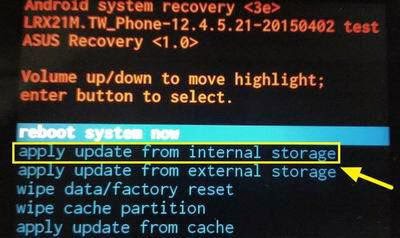
  6. Turn the phone off, then hold down the "power button" and "volume down key" hold to enter Recovery Mode.  
  7. see the following screen, press the volume keys to select " 1. Enter SD download mode ", then press the power button to perform to confirm the action. 
  8. Press the Volume button to select " Apply Update from Internal Storage ", then press the power button to confirm.
  9. Press the Volume button to select " 0 / "and then press the power button to confirm.
  10. Press the volume keys to select " TW_A500KL-11.4.6.94-20141218_M3.5.22-ota-user.zip " / WW_A500KL-11.4.6.94-20141218_M3.5.22-ota-user.zip , then press the power button to confirm.  
  11. After the update is complete, press the volume button to select " Wipe Data / Factory RESET ", then press the power button to confirm.  
  12. Press the volume keys to select " Yes - delete user All Data ", then press the power button to confirm.  
  13. press the volume keys to select " reboot system now ", and then press the power button to confirm.  
  14. Downgrade version is complete, up to [Settings] -> [about] -> [Software Information] to check the version number is a V11.4.6.94 .

الثلاثاء، 12 مايو 2015

[Zenfone 2] Install Android 5.0 Xposed Framework


Since official for 5.x version only for ARM platforms, so younger self synchronous android-ia part of the source code and shakalaca change program a little , compile a copy to ZenFone 2 used Xposed Framework.

Download Xposed Framework For ASUS Zenfone 2 

https://mega.co.nz/#!dsUgzZTb!oYF9XwgeEPkfw6mQ9CHxUk1HbExrdq4aeSFaW_CNJH8
Old Version

New Version, v2.20.40.156 up

Enable USB Debugging>Connect Zenfone 2 to PC/Laptop>Double Click Install.bat (or install.sh) to install. 
pay attention to the official or alpha version, so there will freeze bug will crash phenomenon is very reasonable

DWYOR

Source