‏إظهار الرسائل ذات التسميات Zenfone 5 LTE. إظهار كافة الرسائل

الخميس، 6 أغسطس 2015

[Full Firmware] Zenfone 5 LTE A500KL V12.4.5.42 Support Theme Engine


How to OTA update ? (Go to settings>About>System Update>Check for Update)
How to update Manual ? Here
How to update via ADB sideload ? Here 


Zenfone 5 LTE Version WW_12.4.5.42 Support ZenUI Theme Engine:


ZENFONE 5 LTE firmware: 
WW VERSION
Version WW_12.4.5.42 
DescriptionASUS ZenFone 5 (A500KL) software Image: V12.4.5.42 for WW SKU only*
Improvement Item:

1. Improve quality and volume of ringtone
2. Enhance Lock screen function stability
3. Fix incoming call vibration settings issue
4. Fix Cover View issue
5. Add Clean Maseter
6. Modify lockscreen and quick box layout issue
7. Support to change system UI font

Steps of Update:
1. Check software version of your device**
2. Download device software and Update SOP (From “Manual”
Item)
3. Only apply to same SKU update, Example: WW->WW, CN->CN,
TW->TW.
4. Software update cannot transfer the software SKU and
downgrade the software version.
5. Wrong SKU may cause update failure, please update the
same SKU version only.
*How to know the device model?
Path: Settings->About-> Model number
Example: ASUS_T00I
**How to know the device software version?
Path: Settings->About-> software information->Build number
***System upgrade may cause part of data missing, please buckup
your important data before system upgrading.

File Size886 (MBytes) 2015.07.29  update
Download fromGlobal

الأحد، 17 مايو 2015

How to Downgrade ASUS Zenfone 5 LTE A500KL Lollipop (Android 5.0) to Kitkat (4.4)


Asus already gave an update Android 5.0 Lollipop For ASUS Zenfone 5 LTE A500KL or Asus Zenfone 5 LTE. Today Asus Zenfone Blog will teach you How to Downgrade ASUS Zenfone 5 LTE A500KL from Android 5.0 Lollipop to KitKat 4.4.

Notes:

  1. This method will downgrade Android 5.0 (Lollipop) to Android 4.4 (KitKat) TW_11.4.6.94 or WW_11.4.6.94; software can not be converted back into the other version version.
  2. The system version will revert back to the board to default values ​​and cause data loss; you need to take to back up important data before back version. 
  3. Make sure Zenfone Battery above 20% 
  4. Please go to [Settings] -> [storage space], and select the USB connection mode to " media device (MTP) . "


Procedure:
  1. Please go to the following URL to download descending brush tool:http://www.asus.com/tw/Phones/ZenFone_5_A500KL/HelpDesk_Download/
  2. Select Android
  3. Choose Firmware


  4. Download file ( TW_A500KL_11_4_6_94.zip for TW version and WW_A500KL_11_4_6_94.zip for WW version) decompression, rename​​the following file " TW_A500KL-11.4.6.94-20141218_M3.5.22-ota-user.zip " or " WW_A500KL-11.4.6.94-20141218_M3.5.22-ota-user.zip "
  5. Connect your phone and computer using Micro USB, and copy TW_A500KL-11.4.6.94-20141218_M3.5.22-ota-user.zip/WW_A500KL-11.4.6.94-20141218_M3.5.22-ota-user.zip to the root directory of the phone's internal storage space.
  6. Turn the phone off, then hold down the "power button" and "volume down key" hold to enter Recovery Mode.  
  7. see the following screen, press the volume keys to select " 1. Enter SD download mode ", then press the power button to perform to confirm the action. 
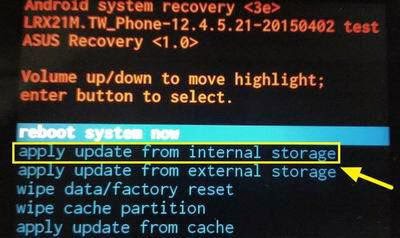
  8. Press the Volume button to select " Apply Update from Internal Storage ", then press the power button to confirm.
  9. Press the Volume button to select " 0 / "and then press the power button to confirm.
  10. Press the volume keys to select " TW_A500KL-11.4.6.94-20141218_M3.5.22-ota-user.zip " / WW_A500KL-11.4.6.94-20141218_M3.5.22-ota-user.zip , then press the power button to confirm.  
  11. After the update is complete, press the volume button to select " Wipe Data / Factory RESET ", then press the power button to confirm.  
  12. Press the volume keys to select " Yes - delete user All Data ", then press the power button to confirm.  
  13. press the volume keys to select " reboot system now ", and then press the power button to confirm.  
  14. Downgrade version is complete, up to [Settings] -> [about] -> [Software Information] to check the version number is a V11.4.6.94 .

الاثنين، 11 مايو 2015

How to Root Asus Zenfone 5 LTE / T00p Android 5.0 Lollipop


This Root Tutorial is for ASUS Zenfone 5 LTE A500KL/T00P Only.

Download Root APK File:


Instructions:

  1. Download APK Kingroot Above
  2. Install APK
  3. Open APK and Click ROOT
  4. Install SuperSU/Superuser from Playstore
DWYOR


الأربعاء، 29 أبريل 2015

Asus Zenfone 5 LTE (A500KL) Lollipop Android 5.0 ROM


How to OTA update ? (Go to settings>About>System Update>Check for Update)
How to update via ADB sideload ? Here 


ZENFONE 5 LTE  Lollipop Android 5.0 firmware: 
WW VERSION
 Version  WW_12.4.5.22 
DescriptionASUS ZenFone 5 (A500KL) software Image: V12.4.5.22 for WW SKU
only* (Android L)
Note1: Please make sure update software version V11.4.6.94 first
before update to software version V12.4.5.22
Note2: Please unzip the file first then put the file to the
device root directory.

Please note! The listed apps below will be removed once the
Android 5.0 Lollipop upgrade is complete.

1. battery Widget
2. Google Text-To-Speech
3. Movie Studio
4. My Frame

If you haven't updated below apps, they will be removed once the
Android 5.0 Lollipop upgrade is complete.
1. Facebook
2. Flipboard

Please note! Some features are added or changed in this system
upgrade
1. Kindle
2. Asus Webstorage
3. Super Note
4. Lockscreen: remove standalone wallpaper & weather info
5. Quick settings/Recent app layout change
6. Dialer/Contacts: reduce tab count from 5 to 3; remove group
tab name/photo
7. InCall screen: remove InCall animation & cover
8. Set default IME as 注音 and English (remove 手寫+倉頡) when
the system is set in Traditional Chinese
9. Add My Ocean wallpaper
10. Add Day Scene Live Wallpaper
11. Add TripAdvisor
12. Add ASUS Auto-start Service Manager

a) Prevent unwanted apps from automatically starting up and
using RAM
b)Stop services immediately and prevent Android from
restarting these apps again
13. Improve VOIP phone call function
14. Improve music function
15. Revise Wallpaper function
 
File Size821 (MBytes)                                                 2015/05/13 update
Download fromGlobal

ZENFONE 5 LTE  Lollipop Android 5.0 firmware: 
TW VERSION
 Version  TW_12.4.5.21 
DescriptionASUS ZenFone 5 (A500KL) software Image: V12.4.5.21 for TW SKU
only* (Android L)
Note1: Please make sure update software version V11.4.6.94 first
before update to software version V12.4.5.21
Note2: Please unzip the file first then put the file to the
device root directory.

Please note! The listed apps below will be removed once the
Android 5.0 Lollipop upgrade is complete.

1. battery Widget
2. Google Text-To-Speech
3. Movie Studio
4. My Frame

If you haven't updated below apps, they will be removed once the
Android 5.0 Lollipop upgrade is complete.
1. Facebook
2. Flipboard

Please note! Some features are added or changed in this system
upgrade
1. Kindle
2. Asus Webstorage
3. Super Note
4. Lockscreen: remove standalone wallpaper & weather info
5. Quick settings/Recent app layout change
6. Dialer/Contacts: reduce tab count from 5 to 3; remove group
tab name/photo
7. InCall screen: remove InCall animation & cover
8. Set default IME as 注音 and English (remove 手寫+倉頡) when
the system is set in Traditional Chinese
9. Add My Ocean wallpaper
10. Add Day Scene Live Wallpaper
11. Add TripAdvisor
12. Add ASUS Auto-start Service Manager

a) Prevent unwanted apps from automatically starting up and
using RAM
b)Stop services immediately and prevent Android from
restarting these apps again
13. Improve VOIP phone call function
14. Improve music function
15. Revise Wallpaper function
 
File Size819,44 (MBytes)                              2015/04/29 update
Download fromGlobal