
الجمعة، 24 أبريل 2015

TWRP - Philz Recovery Zenfone 5 (Kitkat/Lollipop)


Download TWRP-Philz AutoInstaller :


http://adf.ly/1FlzAn

flashing the TWRP Recovery Zenfone 5 (Work at Kitkat/Lollipop)
  1. Download File Above
  2. Enable USB Debugging (Tutorial Here)
  3. Connect Zenfone 5 With PC/Laptop
  4. Double click TWRPRecovery-install.bat

flashing the PhilZ Touch Recovery
Zenfone 5 (Work at Kitkat/Lollipop)
  1. Download File Above
  2. Enable USB Debugging (Tutorial Here)
  3. Connect Zenfone 5 With PC/Laptop
  4. Double click PhilZTouchRecovery-installer.bat

To Apply OTA Update, you must back to Original Recovery:

  1. Download File Above
  2. Enable USB Debugging (Tutorial Here)
  3. Connect Zenfone 5 With PC/Laptop
  4. Double click lockbootloader-forOTA.bat

Video Tutorial:


    الخميس، 23 أبريل 2015

    Philz Touch Recovery Zenfone 5 Kitkat


    Instruction for install Philz Touch Recovery


    1. make sure usb debug is enable
    2. plug your phone while open
    3. double click PhilZTouchRecovery-installer.bat and your done you have PhilZ Touch Recovery
    4. Download file
    5. zenfone kitkat auto installer Philz touch recovery -> download

    Be Inform
    if you stock at usb logo after using PhilZ Touch Recovery
    hold power + volume up youneed to go to droidboot and then process to reboot
    this is not for newbie thanks


    Thanks to Zenfone.ph

    الثلاثاء، 21 أبريل 2015

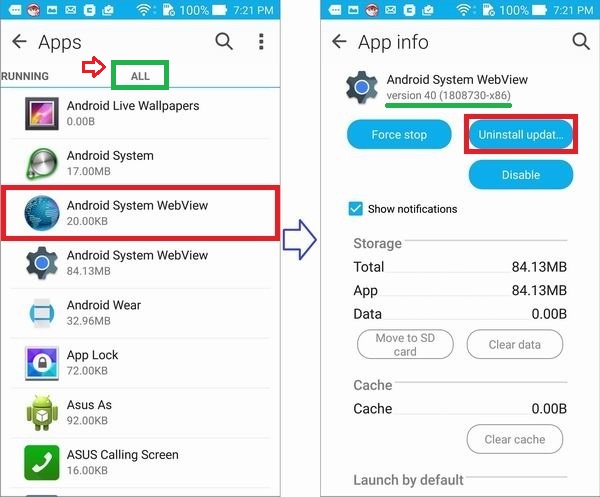
    Android System WebView may cause several apps to crash


    If you have your "Instagram", "Gmail", "ASUS Support", "Facebook" or "Email" app crashed, please follow steps below to uninstall updates of "Android System WebView" (applicable in Android Lollipop). A follow-up complete solution will be provided.


    Uninstall updates of Android System WebView

    1. Select "Android System WebView" (gear icon) in "Settings" -> "Apps", and tap "Uninstall updates". 

    2.  Tap "OK" to set the Android System WebView to original version.

    [ROM] Asus Zenfone 5 Lollipop Beta Version


    Today Asus Zenfone Blog will share Lollipop ROM For Asus Zenfone 5 TW Version. Remember This is Beta Version, You may face some bugs, wait for final release from ASUS for better experience.


    Download ROM:

    http://adf.ly/1FWXlx
    Download ROM
    http://adf.ly/1FWXlx
    MIRROR

    Mirror 2

    MIRROR 3

    Instructions:

    1. Make Sure Your Zenfone 5 is TW Version (You can Migrate from WW/CN to TW Tutorial Here)
    2. Make Sure Your Software Version is the latest TW Version
    3. Copy Lollipop ROM (3 .zip) to Internal Storage and wait for notification update, or via ADB sideload. (Flash order:  UL-ASUS_T00F-TW-2.22.40.39-user.zip then UL-ASUS_T00F-TW-2.22.40.48-user.zip then UL-ASUS_T00F-TW-3.23.40.30-user.zip)
    4. DWYOR :) 

    Lollipop Video Preview:


      الاثنين، 20 أبريل 2015

      [How to fix] Rooted Zenfone 2 Can't Boot After Update


      Today Asus Zenfone Blog will share How to Fix Rooted Zenfone 2 Can't Boot After Update. How to Root Asus Zenfone 2 Can Be Found Here. After using that method to Root My Zenfone 2 yesterday Asus gave Zenfone 2 Update, but after update my Zenfone 2 stuck on bootloop. This tutorial will resolve this problem.

      1. Double wipe your Zenfone 2 (Wipe Cache and Wipe Data, Tutorial Here)
      2. Download your zenfone 2 pre-root system.img Here and Extract it
      3. Flash system.img droidboot.img boot.img and recovery.img using Fastboot command

      الأحد، 19 أبريل 2015

      Asus Zenfone 2 Material Design Apps [4.3+]


      Today Asus Zenfone Blog post about Asus Zenfone 2 ported apps. These Apps can be use for all Android 4.3+ Device. Tested on my Zenfone 4 and 5 4.4.2 and LG G3 Kitkat. Thanks to ThunderSky7 From XDA.


      1. File Manager (Download)
      2. Music (Download)
      3. Calendar (Download)
      4. Quick Memo (Download)
      5. Do it Later (Download)
      6. Browser (Download)
      7. Email (Download)
      8. Sound Recorder (Download)
      9. Calculator (Download)


      الخميس، 16 أبريل 2015

      [Zenfone 2] How to Change Theme


      How to change theme?  
      Change theme  Open "Themes" app, select your preferred theme and tap "Apply". 
      Note: Supported themes may be different in different models or firmware versions.


      Theme style (Take Lovely Pink for example)