‏إظهار الرسائل ذات التسميات Path. إظهار كافة الرسائل

السبت، 7 يونيو 2014

Animation follow touch path forward and backward

Further modify the example of "Change speed of Animation follow touch path" to add feature of animation direction, forward and backward.


AnimationView.java
package com.example.androidanimationalongpath;

import android.content.Context;
import android.graphics.Bitmap;
import android.graphics.BitmapFactory;
import android.graphics.Canvas;
import android.graphics.Color;
import android.graphics.Matrix;
import android.graphics.Paint;
import android.graphics.Path;
import android.graphics.PathMeasure;
import android.util.AttributeSet;
import android.view.MotionEvent;
import android.view.View;

public class AnimationView extends View {

Paint paint;

Bitmap bm;
int bm_offsetX, bm_offsetY;

Path animPath;
PathMeasure pathMeasure;
float pathLength;

float step; //distance each step
float distance; //distance moved
float curX, curY;

float curAngle; //current angle
float targetAngle; //target angle
float stepAngle; //angle each step

float[] pos;
float[] tan;

Matrix matrix;

Path touchPath;

static int FORWARD = 1;
static int BACKWARD = -1;
int direction;

public AnimationView(Context context) {
super(context);
initMyView();
}

public AnimationView(Context context, AttributeSet attrs) {
super(context, attrs);
initMyView();
}

public AnimationView(Context context, AttributeSet attrs, int defStyleAttr) {
super(context, attrs, defStyleAttr);
initMyView();
}

public void initMyView(){
paint = new Paint();
paint.setColor(Color.BLUE);
paint.setStrokeWidth(1);
paint.setStyle(Paint.Style.STROKE);

bm = BitmapFactory.decodeResource(getResources(), R.drawable.ic_launcher);
bm_offsetX = bm.getWidth()/2;
bm_offsetY = bm.getHeight()/2;

animPath = new Path();

pos = new float[2];
tan = new float[2];

matrix = new Matrix();

touchPath = new Path();

step = 1; //default
stepAngle = 1; //default

direction = FORWARD; //default
}

@Override
protected void onDraw(Canvas canvas) {
if(animPath.isEmpty()){
return;
}

canvas.drawPath(animPath, paint);

matrix.reset();

if((targetAngle-curAngle)>stepAngle){
curAngle += stepAngle;
matrix.postRotate(curAngle, bm_offsetX, bm_offsetY);
matrix.postTranslate(curX, curY);
canvas.drawBitmap(bm, matrix, null);

invalidate();
}else if((curAngle-targetAngle)>stepAngle){
curAngle -= stepAngle;
matrix.postRotate(curAngle, bm_offsetX, bm_offsetY);
matrix.postTranslate(curX, curY);
canvas.drawBitmap(bm, matrix, null);

invalidate();
}else{
curAngle=targetAngle;

if((direction==FORWARD && distance < pathLength)
||(direction==BACKWARD && distance > 0)){

pathMeasure.getPosTan(distance, pos, tan);

targetAngle = (float)(Math.atan2(tan[1], tan[0])*180.0/Math.PI);
matrix.postRotate(curAngle, bm_offsetX, bm_offsetY);

curX = pos[0]-bm_offsetX;
curY = pos[1]-bm_offsetY;
matrix.postTranslate(curX, curY);

canvas.drawBitmap(bm, matrix, null);

distance += step * direction;

invalidate();
}else{
matrix.postRotate(curAngle, bm_offsetX, bm_offsetY);
matrix.postTranslate(curX, curY);
canvas.drawBitmap(bm, matrix, null);
}
}

}

@Override
public boolean onTouchEvent(MotionEvent event) {

int action = event.getAction();

switch(action){
case MotionEvent.ACTION_DOWN:
touchPath.reset();
touchPath.moveTo(event.getX(), event.getY());
break;
case MotionEvent.ACTION_MOVE:
touchPath.lineTo(event.getX(), event.getY());
break;
case MotionEvent.ACTION_UP:
touchPath.lineTo(event.getX(), event.getY());
animPath = new Path(touchPath);

pathMeasure = new PathMeasure(animPath, false);
pathLength = pathMeasure.getLength();

//step = 1;
distance = 0;
curX = 0;
curY = 0;

//stepAngle = 1;
curAngle = 0;
targetAngle = 0;

direction = FORWARD;

invalidate();

break;

}

return true;
}

public void setSpeed(int sp){
step = sp;
stepAngle = sp;
}

public void replayForward(){
direction = FORWARD;
invalidate();
}

public void replayBackward(){
direction = BACKWARD;
invalidate();
}

}

/res/layout/activity_main.xml
<LinearLayout xmlns:android="http://schemas.android.com/apk/res/android"
xmlns:tools="http://schemas.android.com/tools"
android:layout_width="match_parent"
android:layout_height="match_parent"
android:orientation="vertical"
android:paddingBottom="@dimen/activity_vertical_margin"
android:paddingLeft="@dimen/activity_horizontal_margin"
android:paddingRight="@dimen/activity_horizontal_margin"
android:paddingTop="@dimen/activity_vertical_margin"
tools:context="com.example.androidanimationalongpath.MainActivity" >

<TextView
android:layout_width="wrap_content"
android:layout_height="wrap_content"
android:layout_gravity="center_horizontal"
android:autoLink="web"
android:text="http://android-er.blogspot.com/"
android:textStyle="bold" />

<LinearLayout
android:layout_width="match_parent"
android:layout_height="wrap_content"
android:orientation="horizontal" >

<Button
android:id="@+id/replayfor"
android:layout_width="0dp"
android:layout_weight="1"
android:layout_height="match_parent"
android:text="Replay/Forward" />
<Button
android:id="@+id/replayback"
android:layout_width="0dp"
android:layout_weight="1"
android:layout_height="match_parent"
android:text="Replay/Backward" />

</LinearLayout>

<SeekBar
android:id="@+id/speedbar"
android:layout_width="match_parent"
android:layout_height="wrap_content"
android:max="10"
android:progress="1"/>

<LinearLayout
android:layout_width="match_parent"
android:layout_height="match_parent"
android:orientation="horizontal" >

<com.example.androidanimationalongpath.AnimationView
android:id="@+id/animationview"
android:layout_width="match_parent"
android:layout_height="match_parent"
android:layout_margin="10dp"
android:background="@android:color/darker_gray" />

</LinearLayout>

</LinearLayout>

MainActivity.java
package com.example.androidanimationalongpath;

import android.support.v7.app.ActionBarActivity;
import android.view.View;
import android.view.View.OnClickListener;
import android.widget.Button;
import android.widget.SeekBar;
import android.widget.SeekBar.OnSeekBarChangeListener;
import android.os.Bundle;

public class MainActivity extends ActionBarActivity {

AnimationView animationView;
SeekBar speedBar;
Button btnForward, btnbackward;

@Override
protected void onCreate(Bundle savedInstanceState) {
super.onCreate(savedInstanceState);
setContentView(R.layout.activity_main);

animationView = (AnimationView)findViewById(R.id.animationview);
speedBar = (SeekBar)findViewById(R.id.speedbar);
speedBar.setOnSeekBarChangeListener(speedBarOnSeekBarChangeListener);
animationView.setSpeed(speedBar.getProgress()); //set default speed

btnForward = (Button)findViewById(R.id.replayfor);
btnForward.setOnClickListener(new OnClickListener(){

@Override
public void onClick(View v) {
animationView.replayForward();
}});

btnbackward = (Button)findViewById(R.id.replayback);
btnbackward.setOnClickListener(new OnClickListener(){

@Override
public void onClick(View v) {
animationView.replayBackward();
}});
}

OnSeekBarChangeListener speedBarOnSeekBarChangeListener =
new OnSeekBarChangeListener(){

@Override
public void onProgressChanged(SeekBar seekBar, int progress,
boolean fromUser) {
//offset from SeekBar 0~19 to step 1~10
animationView.setSpeed(progress);
}

@Override
public void onStartTrackingTouch(SeekBar seekBar) {}

@Override
public void onStopTrackingTouch(SeekBar seekBar) {}
};

}


download filesDownload the files.

More example of Drawing Path on canvas of custom View.


الجمعة، 6 يونيو 2014

Change speed of Animation follow touch path

This exercise change the speed of the former example of "Animation follow touch path".


AnimationView.java
package com.example.androidanimationalongpath;

import android.content.Context;
import android.graphics.Bitmap;
import android.graphics.BitmapFactory;
import android.graphics.Canvas;
import android.graphics.Color;
import android.graphics.Matrix;
import android.graphics.Paint;
import android.graphics.Path;
import android.graphics.PathMeasure;
import android.util.AttributeSet;
import android.view.MotionEvent;
import android.view.View;

public class AnimationView extends View {

Paint paint;

Bitmap bm;
int bm_offsetX, bm_offsetY;

Path animPath;
PathMeasure pathMeasure;
float pathLength;

float step; //distance each step
float distance; //distance moved
float curX, curY;

float curAngle; //current angle
float targetAngle; //target angle
float stepAngle; //angle each step

float[] pos;
float[] tan;

Matrix matrix;

Path touchPath;

public AnimationView(Context context) {
super(context);
initMyView();
}

public AnimationView(Context context, AttributeSet attrs) {
super(context, attrs);
initMyView();
}

public AnimationView(Context context, AttributeSet attrs, int defStyleAttr) {
super(context, attrs, defStyleAttr);
initMyView();
}

public void initMyView(){
paint = new Paint();
paint.setColor(Color.BLUE);
paint.setStrokeWidth(1);
paint.setStyle(Paint.Style.STROKE);

bm = BitmapFactory.decodeResource(getResources(), R.drawable.ic_launcher);
bm_offsetX = bm.getWidth()/2;
bm_offsetY = bm.getHeight()/2;

animPath = new Path();

pos = new float[2];
tan = new float[2];

matrix = new Matrix();

touchPath = new Path();

step = 1; //default
stepAngle = 1; //default
}

@Override
protected void onDraw(Canvas canvas) {
if(animPath.isEmpty()){
return;
}

canvas.drawPath(animPath, paint);

matrix.reset();

if((targetAngle-curAngle)>stepAngle){
curAngle += stepAngle;
matrix.postRotate(curAngle, bm_offsetX, bm_offsetY);
matrix.postTranslate(curX, curY);
canvas.drawBitmap(bm, matrix, null);

invalidate();
}else if((curAngle-targetAngle)>stepAngle){
curAngle -= stepAngle;
matrix.postRotate(curAngle, bm_offsetX, bm_offsetY);
matrix.postTranslate(curX, curY);
canvas.drawBitmap(bm, matrix, null);

invalidate();
}else{
curAngle=targetAngle;
if(distance < pathLength){
pathMeasure.getPosTan(distance, pos, tan);

targetAngle = (float)(Math.atan2(tan[1], tan[0])*180.0/Math.PI);
matrix.postRotate(curAngle, bm_offsetX, bm_offsetY);

curX = pos[0]-bm_offsetX;
curY = pos[1]-bm_offsetY;
matrix.postTranslate(curX, curY);

canvas.drawBitmap(bm, matrix, null);

distance += step;

invalidate();
}else{
matrix.postRotate(curAngle, bm_offsetX, bm_offsetY);
matrix.postTranslate(curX, curY);
canvas.drawBitmap(bm, matrix, null);
}
}

}

@Override
public boolean onTouchEvent(MotionEvent event) {

int action = event.getAction();

switch(action){
case MotionEvent.ACTION_DOWN:
touchPath.reset();
touchPath.moveTo(event.getX(), event.getY());
break;
case MotionEvent.ACTION_MOVE:
touchPath.lineTo(event.getX(), event.getY());
break;
case MotionEvent.ACTION_UP:
touchPath.lineTo(event.getX(), event.getY());
animPath = new Path(touchPath);

pathMeasure = new PathMeasure(animPath, false);
pathLength = pathMeasure.getLength();

//step = 1;
distance = 0;
curX = 0;
curY = 0;

//stepAngle = 1;
curAngle = 0;
targetAngle = 0;

invalidate();

break;

}

return true;
}

public void setSpeed(int sp){
step = sp;
stepAngle = sp;
}

}

/res/layout/activity_main.xml
<LinearLayout xmlns:android="http://schemas.android.com/apk/res/android"
xmlns:tools="http://schemas.android.com/tools"
android:layout_width="match_parent"
android:layout_height="match_parent"
android:orientation="vertical"
android:paddingBottom="@dimen/activity_vertical_margin"
android:paddingLeft="@dimen/activity_horizontal_margin"
android:paddingRight="@dimen/activity_horizontal_margin"
android:paddingTop="@dimen/activity_vertical_margin"
tools:context="com.example.androidanimationalongpath.MainActivity" >

<TextView
android:layout_width="wrap_content"
android:layout_height="wrap_content"
android:layout_gravity="center_horizontal"
android:autoLink="web"
android:text="http://android-er.blogspot.com/"
android:textStyle="bold" />

<SeekBar
android:id="@+id/speedbar"
android:layout_width="match_parent"
android:layout_height="wrap_content"
android:max="10"
android:progress="1"/>

<LinearLayout
android:layout_width="match_parent"
android:layout_height="match_parent"
android:orientation="horizontal" >

<com.example.androidanimationalongpath.AnimationView
android:id="@+id/animationview"
android:layout_width="match_parent"
android:layout_height="match_parent"
android:layout_margin="10dp"
android:background="@android:color/darker_gray" />

</LinearLayout>

</LinearLayout>

MainActivity.java
package com.example.androidanimationalongpath;

import android.support.v7.app.ActionBarActivity;
import android.widget.SeekBar;
import android.widget.SeekBar.OnSeekBarChangeListener;
import android.os.Bundle;

public class MainActivity extends ActionBarActivity {

AnimationView animationView;
SeekBar speedBar;

@Override
protected void onCreate(Bundle savedInstanceState) {
super.onCreate(savedInstanceState);
setContentView(R.layout.activity_main);

animationView = (AnimationView)findViewById(R.id.animationview);
speedBar = (SeekBar)findViewById(R.id.speedbar);
speedBar.setOnSeekBarChangeListener(speedBarOnSeekBarChangeListener);
animationView.setSpeed(speedBar.getProgress()); //set default speed
}

OnSeekBarChangeListener speedBarOnSeekBarChangeListener =
new OnSeekBarChangeListener(){

@Override
public void onProgressChanged(SeekBar seekBar, int progress,
boolean fromUser) {
//offset from SeekBar 0~19 to step 1~10
animationView.setSpeed(progress);
}

@Override
public void onStartTrackingTouch(SeekBar seekBar) {}

@Override
public void onStopTrackingTouch(SeekBar seekBar) {}};


}


download filesDownload the files.

More example of Drawing Path on canvas of custom View.

الأربعاء، 4 يونيو 2014

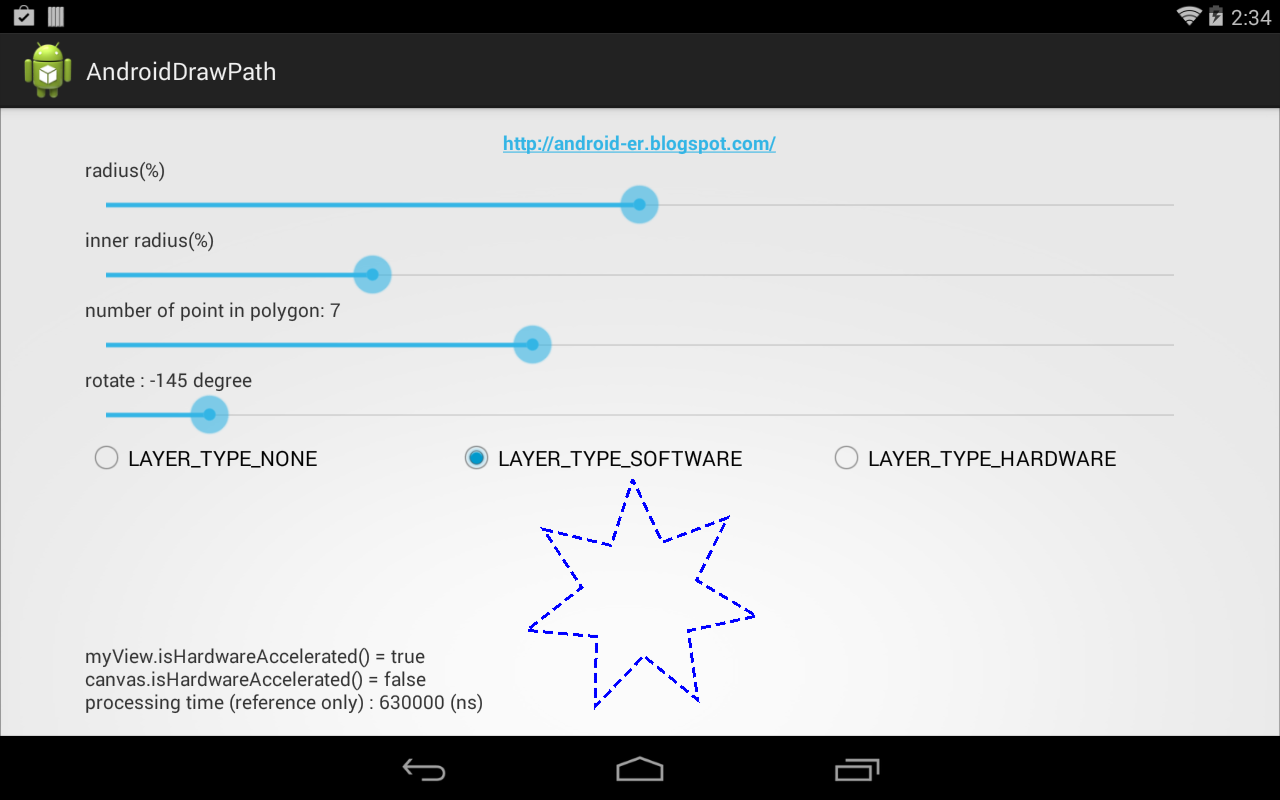
DashPathEffect, apply dash effect on path

To apply DashPathEffect on path:
  //init DashPathEffect
dashPathEffect = new DashPathEffect(
new float[]{10.0f, 5.0f}, //interval
0); //phase

paintDash.setPathEffect(dashPathEffect);

Example:

Modify from last example "Draw rotated path by rotating canvas".

MyView.java
package com.example.androiddrawpath;

import android.content.Context;
import android.graphics.Canvas;
import android.graphics.DashPathEffect;
import android.graphics.Paint;
import android.util.AttributeSet;
import android.view.View;
import android.widget.TextView;

public class MyView extends View {

MyShape myShape;
float ratioRadius, ratioInnerRadius;
int numberOfPoint = 3; //default

float rotate;

//corresponding to UI element
TextView textLayerInfo;

DashPathEffect dashPathEffect;

public MyView(Context context) {
super(context);
initMyView();
}

public MyView(Context context, AttributeSet attrs) {
super(context, attrs);
initMyView();
}

public MyView(Context context, AttributeSet attrs, int defStyleAttr) {
super(context, attrs, defStyleAttr);
initMyView();
}

public void initMyView(){
myShape = new MyShape();

//init DashPathEffect
dashPathEffect = new DashPathEffect(
new float[]{10.0f, 5.0f}, //interval
0); //phase
}

@Override
protected void onDraw(Canvas canvas) {
super.onDraw(canvas);

long starting = System.nanoTime();

int w = getWidth();
int h = getHeight();

if((w==0) || (h==0)){
return;
}

float x = (float)w/2.0f;
float y = (float)h/2.0f;
float radius, innerRadius;
if(w > h){
radius = h * ratioRadius;
innerRadius = h * ratioInnerRadius;
}else{
radius = w * ratioRadius;
innerRadius = w * ratioInnerRadius;
}

myShape.setStar(x, y, radius, innerRadius, numberOfPoint);

//Save and rotate canvas
canvas.save();
canvas.rotate(rotate, x, y);

Paint paintDash = myShape.getPaint();
paintDash.setPathEffect(dashPathEffect);

canvas.drawPath(myShape.getPath(), myShape.getPaint());

//restore canvas
canvas.restore();

long end = System.nanoTime();

String info = "myView.isHardwareAccelerated() = " + isHardwareAccelerated() + "\n"
+ "canvas.isHardwareAccelerated() = " + canvas.isHardwareAccelerated() + "\n"
+ "processing time (reference only) : " + String.valueOf(end - starting) + " (ns)";
textLayerInfo.setText(info);

}

public void setShapeRadiusRatio(float ratio){
ratioRadius = ratio;
}

public void setShapeInnerRadiusRatio(float ratio){
ratioInnerRadius = ratio;
}

public void setNumberOfPoint(int pt){
numberOfPoint = pt;
}

public void passElements(TextView textLayerInfo){
this.textLayerInfo = textLayerInfo;
}

public void setShapeRotate(int rot){
rotate = (float)rot;
}

}

Modify MyShape.java to call paint.setStyle(Paint.Style.STROKE).
package com.example.androiddrawpath;

import android.graphics.Color;
import android.graphics.Paint;
import android.graphics.Path;

public class MyShape {

private Paint paint;
private Path path;

public MyShape() {
paint = new Paint();
paint.setColor(Color.BLUE);
paint.setStrokeWidth(3);
paint.setStyle(Paint.Style.STROKE);
//paint.setStyle(Paint.Style.FILL);
//paint.setStyle(Paint.Style.FILL_AND_STROKE);

path = new Path();
}

public void setCircle(float x, float y, float radius, Path.Direction dir){
path.reset();
path.addCircle(x, y, radius, dir);
}

public void setStar(float x, float y, float radius, float innerRadius, int numOfPt){

double section = 2.0 * Math.PI/numOfPt;

path.reset();
path.moveTo(
(float)(x + radius * Math.cos(0)),
(float)(y + radius * Math.sin(0)));
path.lineTo(
(float)(x + innerRadius * Math.cos(0 + section/2.0)),
(float)(y + innerRadius * Math.sin(0 + section/2.0)));

for(int i=1; i<numOfPt; i++){
path.lineTo(
(float)(x + radius * Math.cos(section * i)),
(float)(y + radius * Math.sin(section * i)));
path.lineTo(
(float)(x + innerRadius * Math.cos(section * i + section/2.0)),
(float)(y + innerRadius * Math.sin(section * i + section/2.0)));
}

path.close();

}

public Path getPath(){
return path;
}

public Paint getPaint(){
return paint;
}

}


download filesDownload the files.

More example of Drawing Path on canvas of custom View.
الاثنين، 2 يونيو 2014

Draw rotated path by rotating canvas

This example show how to draw rotated path by roatating canvas.

  //Save and rotate canvas 
canvas.save();
canvas.rotate(rotate, x, y);

canvas.drawPath(...);

//restore canvas
canvas.restore();


Modify MyView.java in last example "Rotate Path with Matrix", all other files, MainActivity.java, MyShape.java and /res/layout/activity_main.xml, keep no change.

package com.example.androiddrawpath;

import android.content.Context;
import android.graphics.Canvas;
import android.util.AttributeSet;
import android.view.View;
import android.widget.TextView;

public class MyView extends View {

MyShape myShape;
float ratioRadius, ratioInnerRadius;
int numberOfPoint = 3; //default

float rotate;

//corresponding to UI element
TextView textLayerInfo;

public MyView(Context context) {
super(context);
initMyView();
}

public MyView(Context context, AttributeSet attrs) {
super(context, attrs);
initMyView();
}

public MyView(Context context, AttributeSet attrs, int defStyleAttr) {
super(context, attrs, defStyleAttr);
initMyView();
}

public void initMyView(){
myShape = new MyShape();
}

@Override
protected void onDraw(Canvas canvas) {
super.onDraw(canvas);

long starting = System.nanoTime();

int w = getWidth();
int h = getHeight();

if((w==0) || (h==0)){
return;
}

float x = (float)w/2.0f;
float y = (float)h/2.0f;
float radius, innerRadius;
if(w > h){
radius = h * ratioRadius;
innerRadius = h * ratioInnerRadius;
}else{
radius = w * ratioRadius;
innerRadius = w * ratioInnerRadius;
}

myShape.setStar(x, y, radius, innerRadius, numberOfPoint);

//Save and rotate canvas
canvas.save();
canvas.rotate(rotate, x, y);

canvas.drawPath(myShape.getPath(), myShape.getPaint());

//restore canvas
canvas.restore();

long end = System.nanoTime();

String info = "myView.isHardwareAccelerated() = " + isHardwareAccelerated() + "\n"
+ "canvas.isHardwareAccelerated() = " + canvas.isHardwareAccelerated() + "\n"
+ "processing time (reference only) : " + String.valueOf(end - starting) + " (ns)";
textLayerInfo.setText(info);

}

public void setShapeRadiusRatio(float ratio){
ratioRadius = ratio;
}

public void setShapeInnerRadiusRatio(float ratio){
ratioInnerRadius = ratio;
}

public void setNumberOfPoint(int pt){
numberOfPoint = pt;
}

public void passElements(TextView textLayerInfo){
this.textLayerInfo = textLayerInfo;
}

public void setShapeRotate(int rot){
rotate = (float)rot;
}

}

More example of Drawing Path on canvas of custom View.

Rotate Path with Matrix

Example to rotate Path with Matrix:

  matrix.postRotate(rotate, x, y);
path.transform(matrix);

Modify to rotate the example in "Fill Path with color".


MainActivity.java
package com.example.androiddrawpath;

import android.app.Activity;
import android.os.Bundle;
import android.view.View;
import android.widget.CompoundButton;
import android.widget.CompoundButton.OnCheckedChangeListener;
import android.widget.RadioButton;
import android.widget.SeekBar;
import android.widget.SeekBar.OnSeekBarChangeListener;
import android.widget.TextView;

public class MainActivity extends Activity {

SeekBar rotateBar;
TextView rotateText;

SeekBar radiusBar, innerRadiusBar;
MyView myView;

SeekBar ptBar;
TextView textPt;
final static int MIN_PT = 3;

RadioButton optLayerTypeNone, optLayerTypeSoftware, optLayerTypeHardware;
TextView textLayerInfo;

@Override
protected void onCreate(Bundle savedInstanceState) {
super.onCreate(savedInstanceState);
setContentView(R.layout.activity_main);
radiusBar = (SeekBar) findViewById(R.id.radiusbar);
innerRadiusBar = (SeekBar)findViewById(R.id.innerradiusbar);
myView = (MyView) findViewById(R.id.myview);
float defaultRatio = (float) (radiusBar.getProgress())
/ (float) (radiusBar.getMax());
myView.setShapeRadiusRatio(defaultRatio);
float defaultInnerRatio = (float) (innerRadiusBar.getProgress())
/ (float) (innerRadiusBar.getMax());
myView.setShapeInnerRadiusRatio(defaultInnerRatio);

radiusBar.setOnSeekBarChangeListener(radiusBarOnSeekBarChangeListener);
innerRadiusBar.setOnSeekBarChangeListener(innerRadiusBarOnSeekBarChangeListener);

textPt = (TextView)findViewById(R.id.pttext);
ptBar = (SeekBar)findViewById(R.id.ptbar);
ptBar.setOnSeekBarChangeListener(ptBarOnSeekBarChangeListener);

optLayerTypeNone = (RadioButton)findViewById(R.id.typeNone);
optLayerTypeSoftware = (RadioButton)findViewById(R.id.typeSoftware);
optLayerTypeHardware = (RadioButton)findViewById(R.id.typeHardware);
textLayerInfo = (TextView)findViewById(R.id.typeinfo);

myView.passElements(textLayerInfo);
myView.setLayerType(View.LAYER_TYPE_SOFTWARE, null);

optLayerTypeNone.setOnCheckedChangeListener(optLayerTypeOnCheckedChangeListener);
optLayerTypeSoftware.setOnCheckedChangeListener(optLayerTypeOnCheckedChangeListener);
optLayerTypeHardware.setOnCheckedChangeListener(optLayerTypeOnCheckedChangeListener);

rotateText = (TextView)findViewById(R.id.rottext);
rotateBar = (SeekBar)findViewById(R.id.rotatebar);
rotateBar.setOnSeekBarChangeListener(rotateBarOnSeekBarChangeListener);
myView.setRotation(0); //set default rotate degree
};

OnCheckedChangeListener optLayerTypeOnCheckedChangeListener =
new OnCheckedChangeListener(){

@Override
public void onCheckedChanged(CompoundButton buttonView,
boolean isChecked) {
if(optLayerTypeNone.isChecked()){
myView.setLayerType(View.LAYER_TYPE_NONE, null);
}else if(optLayerTypeSoftware.isChecked()){
myView.setLayerType(View.LAYER_TYPE_SOFTWARE, null);
}else{
myView.setLayerType(View.LAYER_TYPE_HARDWARE, null);
}

myView.invalidate();
}};

OnSeekBarChangeListener radiusBarOnSeekBarChangeListener =
new OnSeekBarChangeListener() {

@Override
public void onProgressChanged(SeekBar seekBar, int progress,
boolean fromUser) {
float ratio = (float) (radiusBar.getProgress())
/ (float) (radiusBar.getMax());
myView.setShapeRadiusRatio(ratio);
myView.invalidate();
}

@Override
public void onStartTrackingTouch(SeekBar seekBar) {}

@Override
public void onStopTrackingTouch(SeekBar seekBar) {}

};

OnSeekBarChangeListener innerRadiusBarOnSeekBarChangeListener =
new OnSeekBarChangeListener() {

@Override
public void onProgressChanged(SeekBar seekBar, int progress,
boolean fromUser) {
float ratio = (float) (innerRadiusBar.getProgress())
/ (float) (innerRadiusBar.getMax());
myView.setShapeInnerRadiusRatio(ratio);
myView.invalidate();
}

@Override
public void onStartTrackingTouch(SeekBar seekBar) {}

@Override
public void onStopTrackingTouch(SeekBar seekBar) {}

};

OnSeekBarChangeListener ptBarOnSeekBarChangeListener =
new OnSeekBarChangeListener() {

@Override
public void onProgressChanged(SeekBar seekBar, int progress,
boolean fromUser) {
int pt = progress + MIN_PT;
textPt.setText("number of point in polygon: " + String.valueOf(pt));
myView.setNumberOfPoint(pt);
myView.invalidate();
}

@Override
public void onStartTrackingTouch(SeekBar seekBar) {}

@Override
public void onStopTrackingTouch(SeekBar seekBar) {}

};

OnSeekBarChangeListener rotateBarOnSeekBarChangeListener =
new OnSeekBarChangeListener() {

@Override
public void onProgressChanged(SeekBar seekBar, int progress,
boolean fromUser) {
int degree = progress-180;
rotateText.setText("rotate : " + degree + " degree");
myView.setShapeRotate(degree);
myView.invalidate();
}

@Override
public void onStartTrackingTouch(SeekBar seekBar) {}

@Override
public void onStopTrackingTouch(SeekBar seekBar) {}
};

}

MyView.java
package com.example.androiddrawpath;

import android.content.Context;
import android.graphics.Canvas;
import android.graphics.Matrix;
import android.graphics.Path;
import android.util.AttributeSet;
import android.view.View;
import android.widget.TextView;

public class MyView extends View {

MyShape myShape;
float ratioRadius, ratioInnerRadius;
int numberOfPoint = 3; //default

float rotate;
Matrix matrix;

//corresponding to UI element
TextView textLayerInfo;

public MyView(Context context) {
super(context);
initMyView();
}

public MyView(Context context, AttributeSet attrs) {
super(context, attrs);
initMyView();
}

public MyView(Context context, AttributeSet attrs, int defStyleAttr) {
super(context, attrs, defStyleAttr);
initMyView();
}

public void initMyView(){
myShape = new MyShape();
matrix = new Matrix();
}

@Override
protected void onDraw(Canvas canvas) {
super.onDraw(canvas);

long starting = System.nanoTime();

int w = getWidth();
int h = getHeight();

if((w==0) || (h==0)){
return;
}

float x = (float)w/2.0f;
float y = (float)h/2.0f;
float radius, innerRadius;
if(w > h){
radius = h * ratioRadius;
innerRadius = h * ratioInnerRadius;
}else{
radius = w * ratioRadius;
innerRadius = w * ratioInnerRadius;
}

myShape.setStar(x, y, radius, innerRadius, numberOfPoint);

//Rotate the path by angle in degree
Path path = myShape.getPath();
matrix.reset();
matrix.postRotate(rotate, x, y);
path.transform(matrix);

canvas.drawPath(path, myShape.getPaint());

long end = System.nanoTime();

String info = "myView.isHardwareAccelerated() = " + isHardwareAccelerated() + "\n"
+ "canvas.isHardwareAccelerated() = " + canvas.isHardwareAccelerated() + "\n"
+ "processing time (reference only) : " + String.valueOf(end - starting) + " (ns)";
textLayerInfo.setText(info);

}

public void setShapeRadiusRatio(float ratio){
ratioRadius = ratio;
}

public void setShapeInnerRadiusRatio(float ratio){
ratioInnerRadius = ratio;
}

public void setNumberOfPoint(int pt){
numberOfPoint = pt;
}

public void passElements(TextView textLayerInfo){
this.textLayerInfo = textLayerInfo;
}

public void setShapeRotate(int rot){
rotate = (float)rot;
}

}

MyShape.java
package com.example.androiddrawpath;

import android.graphics.Color;
import android.graphics.Paint;
import android.graphics.Path;

public class MyShape {

private Paint paint;
private Path path;

public MyShape() {
paint = new Paint();
paint.setColor(Color.BLUE);
paint.setStrokeWidth(3);
//paint.setStyle(Paint.Style.STROKE);
//paint.setStyle(Paint.Style.FILL);
paint.setStyle(Paint.Style.FILL_AND_STROKE);

path = new Path();
}

public void setCircle(float x, float y, float radius, Path.Direction dir){
path.reset();
path.addCircle(x, y, radius, dir);
}

public void setStar(float x, float y, float radius, float innerRadius, int numOfPt){

double section = 2.0 * Math.PI/numOfPt;

path.reset();
path.moveTo(
(float)(x + radius * Math.cos(0)),
(float)(y + radius * Math.sin(0)));
path.lineTo(
(float)(x + innerRadius * Math.cos(0 + section/2.0)),
(float)(y + innerRadius * Math.sin(0 + section/2.0)));

for(int i=1; i<numOfPt; i++){
path.lineTo(
(float)(x + radius * Math.cos(section * i)),
(float)(y + radius * Math.sin(section * i)));
path.lineTo(
(float)(x + innerRadius * Math.cos(section * i + section/2.0)),
(float)(y + innerRadius * Math.sin(section * i + section/2.0)));
}

path.close();

}

public Path getPath(){
return path;
}

public Paint getPaint(){
return paint;
}

}

/res/layout/activity_main.xml
<LinearLayout xmlns:android="http://schemas.android.com/apk/res/android"
xmlns:tools="http://schemas.android.com/tools"
android:layout_width="match_parent"
android:layout_height="match_parent"
android:paddingBottom="@dimen/activity_vertical_margin"
android:paddingLeft="@dimen/activity_horizontal_margin"
android:paddingRight="@dimen/activity_horizontal_margin"
android:paddingTop="@dimen/activity_vertical_margin"
android:orientation="vertical"
tools:context="com.example.androiddrawpath.MainActivity" >

<TextView
android:layout_width="wrap_content"
android:layout_height="wrap_content"
android:layout_gravity="center_horizontal"
android:autoLink="web"
android:text="http://android-er.blogspot.com/"
android:textStyle="bold" />

<TextView
android:layout_width="match_parent"
android:layout_height="wrap_content"
android:text="radius(%)"/>
<SeekBar
android:id="@+id/radiusbar"
android:layout_width="match_parent"
android:layout_height="wrap_content"
android:max="100"
android:progress="50" />
<TextView
android:layout_width="match_parent"
android:layout_height="wrap_content"
android:text="inner radius(%)"/>
<SeekBar
android:id="@+id/innerradiusbar"
android:layout_width="match_parent"
android:layout_height="wrap_content"
android:max="100"
android:progress="25" />
<TextView
android:id="@+id/pttext"
android:layout_width="match_parent"
android:layout_height="wrap_content"
android:text="number of point in polygon: 3"/>
<SeekBar
android:id="@+id/ptbar"
android:layout_width="match_parent"
android:layout_height="wrap_content"
android:max="10"
android:progress="0" />

<TextView
android:id="@+id/rottext"
android:layout_width="match_parent"
android:layout_height="wrap_content"
android:text="rotate :"/>
<SeekBar
android:id="@+id/rotatebar"
android:layout_width="match_parent"
android:layout_height="wrap_content"
android:max="360"
android:progress="180" />

<RadioGroup
android:layout_width="fill_parent"
android:layout_height="wrap_content"
android:orientation="horizontal">
<RadioButton android:id="@+id/typeNone"
android:layout_width="0dp"
android:layout_weight="1"
android:layout_height="wrap_content"
android:text="LAYER_TYPE_NONE"/>
<RadioButton android:id="@+id/typeSoftware"
android:layout_width="0dp"
android:layout_weight="1"
android:layout_height="wrap_content"
android:text="LAYER_TYPE_SOFTWARE"/>
<RadioButton android:id="@+id/typeHardware"
android:layout_width="0dp"
android:layout_weight="1"
android:layout_height="wrap_content"
android:text="LAYER_TYPE_HARDWARE"/>
</RadioGroup>

<RelativeLayout
android:layout_width="match_parent"
android:layout_height="match_parent">
<TextView
android:id="@+id/typeinfo"
android:layout_width="match_parent"
android:layout_height="wrap_content"
android:layout_alignParentBottom="true" />
<com.example.androiddrawpath.MyView
android:id="@+id/myview"
android:layout_width="match_parent"
android:layout_height="match_parent" />
</RelativeLayout>

</LinearLayout>


download filesDownload the files.

Related:
- Draw rotated path by rotating canvas

More example of Drawing Path on canvas of custom View.

الأربعاء، 28 مايو 2014

Fill Path with color

To fill path with color, simple replace the code paint.setStyle(Paint.Style.STROKE) to paint.setStyle(Paint.Style.FILL) or paint.setStyle(Paint.Style.FILL_AND_STROKE).


Modify MyShape.java in the example "Draw star on canvas" to fill the star.
package com.example.androiddrawpath;

import android.graphics.Color;
import android.graphics.Paint;
import android.graphics.Path;

public class MyShape {

private Paint paint;
private Path path;

public MyShape() {
paint = new Paint();
paint.setColor(Color.BLUE);
paint.setStrokeWidth(3);
//paint.setStyle(Paint.Style.STROKE);
//paint.setStyle(Paint.Style.FILL);
paint.setStyle(Paint.Style.FILL_AND_STROKE);

path = new Path();
}

public void setCircle(float x, float y, float radius, Path.Direction dir){
path.reset();
path.addCircle(x, y, radius, dir);
}

public void setStar(float x, float y, float radius, float innerRadius, int numOfPt){

double section = 2.0 * Math.PI/numOfPt;

path.reset();
path.moveTo(
(float)(x + radius * Math.cos(0)),
(float)(y + radius * Math.sin(0)));
path.lineTo(
(float)(x + innerRadius * Math.cos(0 + section/2.0)),
(float)(y + innerRadius * Math.sin(0 + section/2.0)));

for(int i=1; i<numOfPt; i++){
path.lineTo(
(float)(x + radius * Math.cos(section * i)),
(float)(y + radius * Math.sin(section * i)));
path.lineTo(
(float)(x + innerRadius * Math.cos(section * i + section/2.0)),
(float)(y + innerRadius * Math.sin(section * i + section/2.0)));
}

path.close();

}

public Path getPath(){
return path;
}

public Paint getPaint(){
return paint;
}

}


More example of Drawing Path on canvas of custom View.

Round corner of path with CornerPathEffect

To make a path with rounded corner, simple call setPathEffect() with CornerPathEffect.

  float radius = 50.0f;
CornerPathEffect cornerPathEffect =
new CornerPathEffect(radius);
paint.setPathEffect(cornerPathEffect);


Modify MyShape.java in the example "Draw star on canvas" to draw the star with rounded corner.
package com.example.androiddrawpath;

import android.graphics.Color;
import android.graphics.CornerPathEffect;
import android.graphics.Paint;
import android.graphics.Path;

public class MyShape {

private Paint paint;
private Path path;

public MyShape() {
paint = new Paint();
paint.setColor(Color.BLUE);
paint.setStrokeWidth(3);
paint.setStyle(Paint.Style.STROKE);

float radius = 50.0f;
CornerPathEffect cornerPathEffect =
new CornerPathEffect(radius);
paint.setPathEffect(cornerPathEffect);

path = new Path();
}

public void setCircle(float x, float y, float radius, Path.Direction dir){
path.reset();
path.addCircle(x, y, radius, dir);
}

public void setStar(float x, float y, float radius, float innerRadius, int numOfPt){

double section = 2.0 * Math.PI/numOfPt;

path.reset();
path.moveTo(
(float)(x + radius * Math.cos(0)),
(float)(y + radius * Math.sin(0)));
path.lineTo(
(float)(x + innerRadius * Math.cos(0 + section/2.0)),
(float)(y + innerRadius * Math.sin(0 + section/2.0)));

for(int i=1; i<numOfPt; i++){
path.lineTo(
(float)(x + radius * Math.cos(section * i)),
(float)(y + radius * Math.sin(section * i)));
path.lineTo(
(float)(x + innerRadius * Math.cos(section * i + section/2.0)),
(float)(y + innerRadius * Math.sin(section * i + section/2.0)));
}

path.close();

}

public Path getPath(){
return path;
}

public Paint getPaint(){
return paint;
}

}


More example of Drawing Path on canvas of custom View.

الثلاثاء، 27 مايو 2014

Animation follow touch path

This example show how to implement animation of moving bitmap follow the touch moving path.


AnimationView.java
package com.example.androidanimationalongpath;

import android.content.Context;
import android.graphics.Bitmap;
import android.graphics.BitmapFactory;
import android.graphics.Canvas;
import android.graphics.Color;
import android.graphics.Matrix;
import android.graphics.Paint;
import android.graphics.Path;
import android.graphics.PathMeasure;
import android.util.AttributeSet;
import android.view.MotionEvent;
import android.view.View;

public class AnimationView extends View {

Paint paint;

Bitmap bm;
int bm_offsetX, bm_offsetY;

Path animPath;
PathMeasure pathMeasure;
float pathLength;

float step; //distance each step
float distance; //distance moved
float curX, curY;

float curAngle; //current angle
float targetAngle; //target angle
float stepAngle; //angle each step

float[] pos;
float[] tan;

Matrix matrix;

Path touchPath;

public AnimationView(Context context) {
super(context);
initMyView();
}

public AnimationView(Context context, AttributeSet attrs) {
super(context, attrs);
initMyView();
}

public AnimationView(Context context, AttributeSet attrs, int defStyleAttr) {
super(context, attrs, defStyleAttr);
initMyView();
}

public void initMyView(){
paint = new Paint();
paint.setColor(Color.BLUE);
paint.setStrokeWidth(1);
paint.setStyle(Paint.Style.STROKE);

bm = BitmapFactory.decodeResource(getResources(), R.drawable.ic_launcher);
bm_offsetX = bm.getWidth()/2;
bm_offsetY = bm.getHeight()/2;

animPath = new Path();

pos = new float[2];
tan = new float[2];

matrix = new Matrix();

touchPath = new Path();
}

@Override
protected void onDraw(Canvas canvas) {

if(animPath.isEmpty()){
return;
}

canvas.drawPath(animPath, paint);

matrix.reset();

if((targetAngle-curAngle)>stepAngle){
curAngle += stepAngle;
matrix.postRotate(curAngle, bm_offsetX, bm_offsetY);
matrix.postTranslate(curX, curY);
canvas.drawBitmap(bm, matrix, null);

invalidate();
}else if((curAngle-targetAngle)>stepAngle){
curAngle -= stepAngle;
matrix.postRotate(curAngle, bm_offsetX, bm_offsetY);
matrix.postTranslate(curX, curY);
canvas.drawBitmap(bm, matrix, null);

invalidate();
}else{
curAngle=targetAngle;
if(distance < pathLength){
pathMeasure.getPosTan(distance, pos, tan);

targetAngle = (float)(Math.atan2(tan[1], tan[0])*180.0/Math.PI);
matrix.postRotate(curAngle, bm_offsetX, bm_offsetY);

curX = pos[0]-bm_offsetX;
curY = pos[1]-bm_offsetY;
matrix.postTranslate(curX, curY);

canvas.drawBitmap(bm, matrix, null);

distance += step;

invalidate();
}else{
matrix.postRotate(curAngle, bm_offsetX, bm_offsetY);
matrix.postTranslate(curX, curY);
canvas.drawBitmap(bm, matrix, null);
}
}

}

@Override
public boolean onTouchEvent(MotionEvent event) {

int action = event.getAction();

switch(action){
case MotionEvent.ACTION_DOWN:
touchPath.reset();
touchPath.moveTo(event.getX(), event.getY());
break;
case MotionEvent.ACTION_MOVE:
touchPath.lineTo(event.getX(), event.getY());
break;
case MotionEvent.ACTION_UP:
touchPath.lineTo(event.getX(), event.getY());
animPath = new Path(touchPath);

pathMeasure = new PathMeasure(animPath, false);
pathLength = pathMeasure.getLength();

step = 1;
distance = 0;
curX = 0;
curY = 0;

stepAngle = 1;
curAngle = 0;
targetAngle = 0;

invalidate();

break;

}

return true;
}

}

/res/layout/activity_main.xml
<LinearLayout xmlns:android="http://schemas.android.com/apk/res/android"
xmlns:tools="http://schemas.android.com/tools"
android:layout_width="match_parent"
android:layout_height="match_parent"
android:orientation="vertical"
android:paddingBottom="@dimen/activity_vertical_margin"
android:paddingLeft="@dimen/activity_horizontal_margin"
android:paddingRight="@dimen/activity_horizontal_margin"
android:paddingTop="@dimen/activity_vertical_margin"
tools:context="com.example.androidanimationalongpath.MainActivity" >

<TextView
android:layout_width="wrap_content"
android:layout_height="wrap_content"
android:layout_gravity="center_horizontal"
android:autoLink="web"
android:text="http://android-er.blogspot.com/"
android:textStyle="bold" />

<LinearLayout
android:layout_width="match_parent"
android:layout_height="match_parent"
android:orientation="horizontal" >

<com.example.androidanimationalongpath.AnimationView
android:layout_width="0dp"
android:layout_weight="1"
android:layout_height="match_parent"
android:layout_margin="10dp"
android:background="@android:color/darker_gray" />

<com.example.androidanimationalongpath.AnimationView
android:layout_width="0dp"
android:layout_weight="1"
android:layout_height="match_parent"
android:layout_margin="10dp"
android:background="@android:color/darker_gray" />
</LinearLayout>

</LinearLayout>

No change on MainActivity.java, refer HERE.


download filesDownload the files.

More example of Drawing Path on canvas of custom View.


الاثنين، 26 مايو 2014

Smooth turning along path

In last example of "Animation of moving bitmap along path", the bitmap turn suddenly in turning points of the path. This example modify to have a smooth turning.


Modify AnimationView.java.
package com.example.androidanimationalongpath;

import android.content.Context;
import android.graphics.Bitmap;
import android.graphics.BitmapFactory;
import android.graphics.Canvas;
import android.graphics.Color;
import android.graphics.Matrix;
import android.graphics.Paint;
import android.graphics.Path;
import android.graphics.PathMeasure;
import android.util.AttributeSet;
import android.view.View;
import android.widget.Toast;

public class AnimationView extends View {

Paint paint;

Bitmap bm;
int bm_offsetX, bm_offsetY;

Path animPath;
PathMeasure pathMeasure;
float pathLength;

float step; //distance each step
float distance; //distance moved
float curX, curY;

float curAngle; //current angle
float targetAngle; //target angle
float stepAngle; //angle each step

float[] pos;
float[] tan;

Matrix matrix;

public AnimationView(Context context) {
super(context);
initMyView();
}

public AnimationView(Context context, AttributeSet attrs) {
super(context, attrs);
initMyView();
}

public AnimationView(Context context, AttributeSet attrs, int defStyleAttr) {
super(context, attrs, defStyleAttr);
initMyView();
}

public void initMyView(){
paint = new Paint();
paint.setColor(Color.BLUE);
paint.setStrokeWidth(1);
paint.setStyle(Paint.Style.STROKE);

bm = BitmapFactory.decodeResource(getResources(), R.drawable.ic_launcher);
bm_offsetX = bm.getWidth()/2;
bm_offsetY = bm.getHeight()/2;

animPath = new Path();
animPath.moveTo(100, 100);
animPath.lineTo(200, 100);
animPath.lineTo(300, 50);
animPath.lineTo(400, 150);
animPath.lineTo(100, 300);
animPath.lineTo(600, 300);
animPath.lineTo(100, 100);
animPath.close();

pathMeasure = new PathMeasure(animPath, false);
pathLength = pathMeasure.getLength();

Toast.makeText(getContext(), "pathLength: " + pathLength, Toast.LENGTH_LONG).show();

step = 1;
distance = 0;
curX = 0;
curY = 0;

stepAngle = 1;
curAngle = 0;
targetAngle = 0;

pos = new float[2];
tan = new float[2];

matrix = new Matrix();
}

@Override
protected void onDraw(Canvas canvas) {

canvas.drawPath(animPath, paint);

matrix.reset();

if((targetAngle-curAngle)>stepAngle){
curAngle += stepAngle;
matrix.postRotate(curAngle, bm_offsetX, bm_offsetY);
matrix.postTranslate(curX, curY);
canvas.drawBitmap(bm, matrix, null);
}else if((curAngle-targetAngle)>stepAngle){
curAngle -= stepAngle;
matrix.postRotate(curAngle, bm_offsetX, bm_offsetY);
matrix.postTranslate(curX, curY);
canvas.drawBitmap(bm, matrix, null);
}else{
curAngle=targetAngle;
if(distance < pathLength){
pathMeasure.getPosTan(distance, pos, tan);

targetAngle = (float)(Math.atan2(tan[1], tan[0])*180.0/Math.PI);
matrix.postRotate(curAngle, bm_offsetX, bm_offsetY);

curX = pos[0]-bm_offsetX;
curY = pos[1]-bm_offsetY;
matrix.postTranslate(curX, curY);

canvas.drawBitmap(bm, matrix, null);

distance += step;
}else{
distance = 0;
}
}

invalidate();
}

}

Other files, MainActivity.java and /res/layout/activity_main.xml, refer last exercise.

download filesDownload the files.

More example of Drawing Path on canvas of custom View.

Animation of moving bitmap along path

This example show how to animate a moving bitmap along path.


In order to get the position and angle of the animated bitmap in a distance along a path, we use the code:
  pathMeasure = new PathMeasure(animPath, false);
pathLength = pathMeasure.getLength();

...
pathMeasure.getPosTan(distance, pos, tan);

where pos, and tan are float[2] passed to retrieve the resulting position and tangent.

MainActivity.java.
package com.example.androidanimationalongpath;

import android.support.v7.app.ActionBarActivity;
import android.os.Bundle;

public class MainActivity extends ActionBarActivity {

@Override
protected void onCreate(Bundle savedInstanceState) {
super.onCreate(savedInstanceState);
setContentView(R.layout.activity_main);

}

}

/res/layout/activity_main.xml, simple include our custom view in layout.
<LinearLayout xmlns:android="http://schemas.android.com/apk/res/android"
xmlns:tools="http://schemas.android.com/tools"
android:layout_width="match_parent"
android:layout_height="match_parent"
android:paddingBottom="@dimen/activity_vertical_margin"
android:paddingLeft="@dimen/activity_horizontal_margin"
android:paddingRight="@dimen/activity_horizontal_margin"
android:paddingTop="@dimen/activity_vertical_margin"
android:orientation="vertical"
tools:context="com.example.androidanimationalongpath.MainActivity" >

<TextView
android:layout_width="wrap_content"
android:layout_height="wrap_content"
android:layout_gravity="center_horizontal"
android:autoLink="web"
android:text="http://android-er.blogspot.com/"
android:textStyle="bold" />

<com.example.androidanimationalongpath.AnimationView
android:layout_width="match_parent"
android:layout_height="match_parent"/>

</LinearLayout>

AnimationView.java, custom view.
package com.example.androidanimationalongpath;

import android.content.Context;
import android.graphics.Bitmap;
import android.graphics.BitmapFactory;
import android.graphics.Canvas;
import android.graphics.Color;
import android.graphics.Matrix;
import android.graphics.Paint;
import android.graphics.Path;
import android.graphics.PathMeasure;
import android.util.AttributeSet;
import android.view.View;
import android.widget.Toast;

public class AnimationView extends View {

Paint paint;

Bitmap bm;
int bm_offsetX, bm_offsetY;

Path animPath;
PathMeasure pathMeasure;
float pathLength;

float step; //distance each step
float distance; //distance moved

float[] pos;
float[] tan;

Matrix matrix;

public AnimationView(Context context) {
super(context);
initMyView();
}

public AnimationView(Context context, AttributeSet attrs) {
super(context, attrs);
initMyView();
}

public AnimationView(Context context, AttributeSet attrs, int defStyleAttr) {
super(context, attrs, defStyleAttr);
initMyView();
}

public void initMyView(){
paint = new Paint();
paint.setColor(Color.BLUE);
paint.setStrokeWidth(1);
paint.setStyle(Paint.Style.STROKE);

bm = BitmapFactory.decodeResource(getResources(), R.drawable.ic_launcher);
bm_offsetX = bm.getWidth()/2;
bm_offsetY = bm.getHeight()/2;

animPath = new Path();
animPath.moveTo(100, 100);
animPath.lineTo(200, 100);
animPath.lineTo(300, 50);
animPath.lineTo(400, 150);
animPath.lineTo(100, 300);
animPath.lineTo(600, 300);
animPath.lineTo(100, 100);
animPath.close();

pathMeasure = new PathMeasure(animPath, false);
pathLength = pathMeasure.getLength();

Toast.makeText(getContext(), "pathLength: " + pathLength, Toast.LENGTH_LONG).show();

step = 1;
distance = 0;
pos = new float[2];
tan = new float[2];

matrix = new Matrix();
}

@Override
protected void onDraw(Canvas canvas) {

canvas.drawPath(animPath, paint);

if(distance < pathLength){
pathMeasure.getPosTan(distance, pos, tan);

matrix.reset();
float degrees = (float)(Math.atan2(tan[1], tan[0])*180.0/Math.PI);
matrix.postRotate(degrees, bm_offsetX, bm_offsetY);
matrix.postTranslate(pos[0]-bm_offsetX, pos[1]-bm_offsetY);

canvas.drawBitmap(bm, matrix, null);

distance += step;
}else{
distance = 0;
}

invalidate();
}

}


download filesDownload the files.

Next:
- Smooth turning along path

More example of Drawing Path on canvas of custom View.

Updated@2016-08-09:
- Custom view to draw bitmap along path, in separate object

Draw star on canvas

Show how to draw star on canvas of custom View. More examples of drawing Path on canvas of custom View HERE.


MainActivity.java
package com.example.androiddrawpath;

import android.app.Activity;
import android.os.Bundle;
import android.view.View;
import android.widget.CompoundButton;
import android.widget.CompoundButton.OnCheckedChangeListener;
import android.widget.RadioButton;
import android.widget.SeekBar;
import android.widget.SeekBar.OnSeekBarChangeListener;
import android.widget.TextView;

public class MainActivity extends Activity {

SeekBar radiusBar, innerRadiusBar;
MyView myView;

SeekBar ptBar;
TextView textPt;
final static int MIN_PT = 3;

RadioButton optLayerTypeNone, optLayerTypeSoftware, optLayerTypeHardware;
TextView textLayerInfo;

@Override
protected void onCreate(Bundle savedInstanceState) {
super.onCreate(savedInstanceState);
setContentView(R.layout.activity_main);
radiusBar = (SeekBar) findViewById(R.id.radiusbar);
innerRadiusBar = (SeekBar)findViewById(R.id.innerradiusbar);
myView = (MyView) findViewById(R.id.myview);
float defaultRatio = (float) (radiusBar.getProgress())
/ (float) (radiusBar.getMax());
myView.setShapeRadiusRatio(defaultRatio);
float defaultInnerRatio = (float) (innerRadiusBar.getProgress())
/ (float) (innerRadiusBar.getMax());
myView.setShapeInnerRadiusRatio(defaultInnerRatio);

radiusBar.setOnSeekBarChangeListener(radiusBarOnSeekBarChangeListener);
innerRadiusBar.setOnSeekBarChangeListener(innerRadiusBarOnSeekBarChangeListener);

textPt = (TextView)findViewById(R.id.pttext);
ptBar = (SeekBar)findViewById(R.id.ptbar);
ptBar.setOnSeekBarChangeListener(ptBarOnSeekBarChangeListener);

optLayerTypeNone = (RadioButton)findViewById(R.id.typeNone);
optLayerTypeSoftware = (RadioButton)findViewById(R.id.typeSoftware);
optLayerTypeHardware = (RadioButton)findViewById(R.id.typeHardware);
textLayerInfo = (TextView)findViewById(R.id.typeinfo);

myView.passElements(textLayerInfo);
myView.setLayerType(View.LAYER_TYPE_SOFTWARE, null);

optLayerTypeNone.setOnCheckedChangeListener(optLayerTypeOnCheckedChangeListener);
optLayerTypeSoftware.setOnCheckedChangeListener(optLayerTypeOnCheckedChangeListener);
optLayerTypeHardware.setOnCheckedChangeListener(optLayerTypeOnCheckedChangeListener);
};

OnCheckedChangeListener optLayerTypeOnCheckedChangeListener =
new OnCheckedChangeListener(){

@Override
public void onCheckedChanged(CompoundButton buttonView,
boolean isChecked) {
if(optLayerTypeNone.isChecked()){
myView.setLayerType(View.LAYER_TYPE_NONE, null);
}else if(optLayerTypeSoftware.isChecked()){
myView.setLayerType(View.LAYER_TYPE_SOFTWARE, null);
}else{
myView.setLayerType(View.LAYER_TYPE_HARDWARE, null);
}

myView.invalidate();
}};

OnSeekBarChangeListener radiusBarOnSeekBarChangeListener =
new OnSeekBarChangeListener() {

@Override
public void onProgressChanged(SeekBar seekBar, int progress,
boolean fromUser) {
float ratio = (float) (radiusBar.getProgress())
/ (float) (radiusBar.getMax());
myView.setShapeRadiusRatio(ratio);
myView.invalidate();
}

@Override
public void onStartTrackingTouch(SeekBar seekBar) {}

@Override
public void onStopTrackingTouch(SeekBar seekBar) {}

};

OnSeekBarChangeListener innerRadiusBarOnSeekBarChangeListener =
new OnSeekBarChangeListener() {

@Override
public void onProgressChanged(SeekBar seekBar, int progress,
boolean fromUser) {
float ratio = (float) (innerRadiusBar.getProgress())
/ (float) (innerRadiusBar.getMax());
myView.setShapeInnerRadiusRatio(ratio);
myView.invalidate();
}

@Override
public void onStartTrackingTouch(SeekBar seekBar) {}

@Override
public void onStopTrackingTouch(SeekBar seekBar) {}

};

OnSeekBarChangeListener ptBarOnSeekBarChangeListener =
new OnSeekBarChangeListener() {

@Override
public void onProgressChanged(SeekBar seekBar, int progress,
boolean fromUser) {
int pt = progress + MIN_PT;
textPt.setText("number of point in polygon: " + String.valueOf(pt));
myView.setNumberOfPoint(pt);
myView.invalidate();
}

@Override
public void onStartTrackingTouch(SeekBar seekBar) {}

@Override
public void onStopTrackingTouch(SeekBar seekBar) {}

};

}

MyView.java
package com.example.androiddrawpath;

import android.content.Context;
import android.graphics.Canvas;
import android.util.AttributeSet;
import android.view.View;
import android.widget.TextView;

public class MyView extends View {

MyShape myShape;
float ratioRadius, ratioInnerRadius;
int numberOfPoint = 3; //default

//corresponding to UI element
TextView textLayerInfo;

public MyView(Context context) {
super(context);
initMyView();
}

public MyView(Context context, AttributeSet attrs) {
super(context, attrs);
initMyView();
}

public MyView(Context context, AttributeSet attrs, int defStyleAttr) {
super(context, attrs, defStyleAttr);
initMyView();
}

public void initMyView(){
myShape = new MyShape();
}

@Override
protected void onDraw(Canvas canvas) {
super.onDraw(canvas);

long starting = System.nanoTime();

int w = getWidth();
int h = getHeight();

if((w==0) || (h==0)){
return;
}

float x = (float)w/2.0f;
float y = (float)h/2.0f;
float radius, innerRadius;
if(w > h){
radius = h * ratioRadius;
innerRadius = h * ratioInnerRadius;
}else{
radius = w * ratioRadius;
innerRadius = w * ratioInnerRadius;
}

myShape.setStar(x, y, radius, innerRadius, numberOfPoint);
canvas.drawPath(myShape.getPath(), myShape.getPaint());

long end = System.nanoTime();

String info = "myView.isHardwareAccelerated() = " + isHardwareAccelerated() + "\n"
+ "canvas.isHardwareAccelerated() = " + canvas.isHardwareAccelerated() + "\n"
+ "processing time (reference only) : " + String.valueOf(end - starting) + " (ns)";
textLayerInfo.setText(info);

}

public void setShapeRadiusRatio(float ratio){
ratioRadius = ratio;
}

public void setShapeInnerRadiusRatio(float ratio){
ratioInnerRadius = ratio;
}

public void setNumberOfPoint(int pt){
numberOfPoint = pt;
}

public void passElements(TextView textLayerInfo){
this.textLayerInfo = textLayerInfo;
}

}

MyShape.java
package com.example.androiddrawpath;

import android.graphics.Color;
import android.graphics.Paint;
import android.graphics.Path;

public class MyShape {

private Paint paint;
private Path path;

public MyShape() {
paint = new Paint();
paint.setColor(Color.BLUE);
paint.setStrokeWidth(3);
paint.setStyle(Paint.Style.STROKE);

path = new Path();
}

public void setCircle(float x, float y, float radius, Path.Direction dir){
path.reset();
path.addCircle(x, y, radius, dir);
}

public void setStar(float x, float y, float radius, float innerRadius, int numOfPt){

double section = 2.0 * Math.PI/numOfPt;

path.reset();
path.moveTo(
(float)(x + radius * Math.cos(0)),
(float)(y + radius * Math.sin(0)));
path.lineTo(
(float)(x + innerRadius * Math.cos(0 + section/2.0)),
(float)(y + innerRadius * Math.sin(0 + section/2.0)));

for(int i=1; i<numOfPt; i++){
path.lineTo(
(float)(x + radius * Math.cos(section * i)),
(float)(y + radius * Math.sin(section * i)));
path.lineTo(
(float)(x + innerRadius * Math.cos(section * i + section/2.0)),
(float)(y + innerRadius * Math.sin(section * i + section/2.0)));
}

path.close();

}

public Path getPath(){
return path;
}

public Paint getPaint(){
return paint;
}

}

/res/layout/activity_main.xml
<LinearLayout xmlns:android="http://schemas.android.com/apk/res/android"
xmlns:tools="http://schemas.android.com/tools"
android:layout_width="match_parent"
android:layout_height="match_parent"
android:paddingBottom="@dimen/activity_vertical_margin"
android:paddingLeft="@dimen/activity_horizontal_margin"
android:paddingRight="@dimen/activity_horizontal_margin"
android:paddingTop="@dimen/activity_vertical_margin"
android:orientation="vertical"
tools:context="com.example.androiddrawpath.MainActivity" >

<TextView
android:layout_width="wrap_content"
android:layout_height="wrap_content"
android:layout_gravity="center_horizontal"
android:autoLink="web"
android:text="http://android-er.blogspot.com/"
android:textStyle="bold" />

<TextView
android:layout_width="match_parent"
android:layout_height="wrap_content"
android:text="radius(%)"/>
<SeekBar
android:id="@+id/radiusbar"
android:layout_width="match_parent"
android:layout_height="wrap_content"
android:max="100"
android:progress="50" />
<TextView
android:layout_width="match_parent"
android:layout_height="wrap_content"
android:text="inner radius(%)"/>
<SeekBar
android:id="@+id/innerradiusbar"
android:layout_width="match_parent"
android:layout_height="wrap_content"
android:max="100"
android:progress="25" />
<TextView
android:id="@+id/pttext"
android:layout_width="match_parent"
android:layout_height="wrap_content"
android:text="number of point in polygon: 3"/>
<SeekBar
android:id="@+id/ptbar"
android:layout_width="match_parent"
android:layout_height="wrap_content"
android:max="10"
android:progress="0" />

<RadioGroup
android:layout_width="fill_parent"
android:layout_height="wrap_content"
android:orientation="horizontal">
<RadioButton android:id="@+id/typeNone"
android:layout_width="0dp"
android:layout_weight="1"
android:layout_height="wrap_content"
android:text="LAYER_TYPE_NONE"/>
<RadioButton android:id="@+id/typeSoftware"
android:layout_width="0dp"
android:layout_weight="1"
android:layout_height="wrap_content"
android:text="LAYER_TYPE_SOFTWARE"/>
<RadioButton android:id="@+id/typeHardware"
android:layout_width="0dp"
android:layout_weight="1"
android:layout_height="wrap_content"
android:text="LAYER_TYPE_HARDWARE"/>
</RadioGroup>

<RelativeLayout
android:layout_width="match_parent"
android:layout_height="match_parent">
<TextView
android:id="@+id/typeinfo"
android:layout_width="match_parent"
android:layout_height="wrap_content"
android:layout_alignParentBottom="true" />
<com.example.androiddrawpath.MyView
android:id="@+id/myview"
android:layout_width="match_parent"
android:layout_height="match_parent" />
</RelativeLayout>

</LinearLayout>


download filesDownload the files.

Next:
- Draw rounded corner star on canvas

More example of Drawing Path on canvas of custom View.

الجمعة، 23 مايو 2014

Draw Path of polygon on canvas of custom View

This example works on last, to draw Path of equal-length polygon, on canvas.


MainActivity.java
package com.example.androiddrawpath;

import android.app.Activity;
import android.os.Bundle;
import android.widget.SeekBar;
import android.widget.SeekBar.OnSeekBarChangeListener;
import android.widget.TextView;

public class MainActivity extends Activity {

SeekBar radiusBar;
MyView myView;

SeekBar ptBar;
TextView textPt;
final static int MIN_PT = 3;

@Override
protected void onCreate(Bundle savedInstanceState) {
super.onCreate(savedInstanceState);
setContentView(R.layout.activity_main);
radiusBar = (SeekBar) findViewById(R.id.radiusbar);
myView = (MyView) findViewById(R.id.myview);
float defaultRatio = (float) (radiusBar.getProgress())
/ (float) (radiusBar.getMax());
myView.setShapeRadiusRatio(defaultRatio);

radiusBar.setOnSeekBarChangeListener(radiusBarOnSeekBarChangeListener);

textPt = (TextView)findViewById(R.id.pttext);
ptBar = (SeekBar)findViewById(R.id.ptbar);
ptBar.setOnSeekBarChangeListener(ptBarOnSeekBarChangeListener);

};

OnSeekBarChangeListener radiusBarOnSeekBarChangeListener =
new OnSeekBarChangeListener() {

@Override
public void onProgressChanged(SeekBar seekBar, int progress,
boolean fromUser) {
float ratio = (float) (radiusBar.getProgress())
/ (float) (radiusBar.getMax());
myView.setShapeRadiusRatio(ratio);
myView.invalidate();
}

@Override
public void onStartTrackingTouch(SeekBar seekBar) {}

@Override
public void onStopTrackingTouch(SeekBar seekBar) {}

};

OnSeekBarChangeListener ptBarOnSeekBarChangeListener =
new OnSeekBarChangeListener() {

@Override
public void onProgressChanged(SeekBar seekBar, int progress,
boolean fromUser) {
int pt = progress + MIN_PT;
textPt.setText("number of point in polygon: " + String.valueOf(pt));
myView.setNumberOfPoint(pt);
myView.invalidate();
}

@Override
public void onStartTrackingTouch(SeekBar seekBar) {}

@Override
public void onStopTrackingTouch(SeekBar seekBar) {}

};

}

MyView.java, our custom View.
package com.example.androiddrawpath;

import android.content.Context;
import android.graphics.Canvas;
import android.util.AttributeSet;
import android.view.View;

public class MyView extends View {

MyShape myShape;
float ratioRadius;
int numberOfPoint = 3; //default

public MyView(Context context) {
super(context);
initMyView();
}

public MyView(Context context, AttributeSet attrs) {
super(context, attrs);
initMyView();
}

public MyView(Context context, AttributeSet attrs, int defStyleAttr) {
super(context, attrs, defStyleAttr);
initMyView();
}

public void initMyView(){
myShape = new MyShape();
}

@Override
protected void onDraw(Canvas canvas) {
super.onDraw(canvas);

int w = getWidth();
int h = getHeight();

if((w==0) || (h==0)){
return;
}

float x = (float)w/2.0f;
float y = (float)h/2.0f;
float radius;
if(w > h){
radius = h * ratioRadius;
}else{
radius = w * ratioRadius;
}

myShape.setPolygon(x, y, radius, numberOfPoint);
canvas.drawPath(myShape.getPath(), myShape.getPaint());
}

public void setShapeRadiusRatio(float ratio){
ratioRadius = ratio;
}

public void setNumberOfPoint(int pt){
numberOfPoint = pt;
}

}

MyShape.java, it is the object hold the Path and Paint to be drawn on our View.
package com.example.androiddrawpath;

import android.graphics.Color;
import android.graphics.Paint;
import android.graphics.Path;

public class MyShape {

private Paint paint;
private Path path;

public MyShape() {
paint = new Paint();
paint.setColor(Color.BLUE);
paint.setStrokeWidth(3);
paint.setStyle(Paint.Style.STROKE);

path = new Path();
}

public void setCircle(float x, float y, float radius, Path.Direction dir){
path.reset();
path.addCircle(x, y, radius, dir);
}

public void setPolygon(float x, float y, float radius, int numOfPt){

double section = 2.0 * Math.PI/numOfPt;

path.reset();
path.moveTo(
(float)(x + radius * Math.cos(0)),
(float)(y + radius * Math.sin(0)));

for(int i=1; i<numOfPt; i++){
path.lineTo(
(float)(x + radius * Math.cos(section * i)),
(float)(y + radius * Math.sin(section * i)));
}

path.close();

}

public Path getPath(){
return path;
}

public Paint getPaint(){
return paint;
}

}

/res/layout/activity_main.xml.
<LinearLayout xmlns:android="http://schemas.android.com/apk/res/android"
xmlns:tools="http://schemas.android.com/tools"
android:layout_width="match_parent"
android:layout_height="match_parent"
android:paddingBottom="@dimen/activity_vertical_margin"
android:paddingLeft="@dimen/activity_horizontal_margin"
android:paddingRight="@dimen/activity_horizontal_margin"
android:paddingTop="@dimen/activity_vertical_margin"
android:orientation="vertical"
tools:context="com.example.androiddrawpath.MainActivity" >

<TextView
android:layout_width="wrap_content"
android:layout_height="wrap_content"
android:layout_gravity="center_horizontal"
android:autoLink="web"
android:text="http://android-er.blogspot.com/"
android:textStyle="bold" />

<TextView
android:layout_width="match_parent"
android:layout_height="wrap_content"
android:text="radius(%)"/>
<SeekBar
android:id="@+id/radiusbar"
android:layout_width="match_parent"
android:layout_height="wrap_content"
android:max="100"
android:progress="50" />
<TextView
android:id="@+id/pttext"
android:layout_width="match_parent"
android:layout_height="wrap_content"
android:text="number of point in polygon: 3"/>
<SeekBar
android:id="@+id/ptbar"
android:layout_width="match_parent"
android:layout_height="wrap_content"
android:max="10"
android:progress="0" />

<com.example.androiddrawpath.MyView
android:id="@+id/myview"
android:layout_width="match_parent"
android:layout_height="match_parent" />

</LinearLayout>


download filesDownload the files.

More examples of Draw Path on canvas of custom View.

Draw Path on canvas of custom View

This example show drawing Path of circle on canvas of custom View, user can adjust its ratio using twh SeekBar. It will be the base of coming exercises.


MainActivity.java
package com.example.androiddrawpath;

import android.app.Activity;
import android.os.Bundle;
import android.widget.SeekBar;
import android.widget.SeekBar.OnSeekBarChangeListener;

public class MainActivity extends Activity {

SeekBar radiusBar;
MyView myView;

@Override
protected void onCreate(Bundle savedInstanceState) {
super.onCreate(savedInstanceState);
setContentView(R.layout.activity_main);
radiusBar = (SeekBar) findViewById(R.id.radiusbar);
myView = (MyView) findViewById(R.id.myview);
float defaultRatio = (float) (radiusBar.getProgress())
/ (float) (radiusBar.getMax());
myView.setShapeRadiusRatio(defaultRatio);

radiusBar.setOnSeekBarChangeListener(radiusBarOnSeekBarChangeListener);

};

OnSeekBarChangeListener radiusBarOnSeekBarChangeListener =
new OnSeekBarChangeListener() {

@Override
public void onProgressChanged(SeekBar seekBar, int progress,
boolean fromUser) {
float defaultRatio = (float) (radiusBar.getProgress())
/ (float) (radiusBar.getMax());
myView.setShapeRadiusRatio(defaultRatio);
myView.invalidate();
}

@Override
public void onStartTrackingTouch(SeekBar seekBar) {
}

@Override
public void onStopTrackingTouch(SeekBar seekBar) {
}

};

}

MyView.java, our custom View.
package com.example.androiddrawpath;

import android.content.Context;
import android.graphics.Canvas;
import android.graphics.Path.Direction;
import android.util.AttributeSet;
import android.view.View;

public class MyView extends View {

MyShape myShape;
float ratioRadius;

public MyView(Context context) {
super(context);
initMyView();
}

public MyView(Context context, AttributeSet attrs) {
super(context, attrs);
initMyView();
}

public MyView(Context context, AttributeSet attrs, int defStyleAttr) {
super(context, attrs, defStyleAttr);
initMyView();
}

public void initMyView(){
myShape = new MyShape();
}

@Override
protected void onDraw(Canvas canvas) {
super.onDraw(canvas);

int w = getWidth();
int h = getHeight();

if((w==0) || (h==0)){
return;
}

float x = (float)w/2.0f;
float y = (float)h/2.0f;
float radius;
if(w > h){
radius = h * ratioRadius;
}else{
radius = w * ratioRadius;
}

myShape.setCircle(x, y, radius, Direction.CCW);
canvas.drawPath(myShape.getPath(), myShape.getPaint());
}

public void setShapeRadiusRatio(float ratio){
ratioRadius = ratio;
}

}

MyShape.java, it is the object hold the Path and Paint to be drawn on our View.
package com.example.androiddrawpath;

import android.graphics.Color;
import android.graphics.Paint;
import android.graphics.Path;

public class MyShape {

private Paint paint;
private Path path;

public MyShape() {
paint = new Paint();
paint.setColor(Color.BLUE);
paint.setStrokeWidth(3);
paint.setStyle(Paint.Style.STROKE);

path = new Path();
}

public void setCircle(float x, float y, float radius, Path.Direction dir){
path.reset();
path.addCircle(x, y, radius, dir);
}

public Path getPath(){
return path;
}

public Paint getPaint(){
return paint;
}

}

Layout, /res/layout/activity_main.xml.
<LinearLayout xmlns:android="http://schemas.android.com/apk/res/android"
xmlns:tools="http://schemas.android.com/tools"
android:layout_width="match_parent"
android:layout_height="match_parent"
android:paddingBottom="@dimen/activity_vertical_margin"
android:paddingLeft="@dimen/activity_horizontal_margin"
android:paddingRight="@dimen/activity_horizontal_margin"
android:paddingTop="@dimen/activity_vertical_margin"
android:orientation="vertical"
tools:context="com.example.androiddrawpath.MainActivity" >

<TextView
android:layout_width="wrap_content"
android:layout_height="wrap_content"
android:layout_gravity="center_horizontal"
android:autoLink="web"
android:text="http://android-er.blogspot.com/"
android:textStyle="bold" />

<TextView
android:layout_width="match_parent"
android:layout_height="wrap_content"
android:text="radius(%)"/>
<SeekBar
android:id="@+id/radiusbar"
android:layout_width="match_parent"
android:layout_height="wrap_content"
android:max="100"
android:progress="50" />

<com.example.androiddrawpath.MyView
android:id="@+id/myview"
android:layout_width="match_parent"
android:layout_height="match_parent" />

</LinearLayout>

download filesDownload the files.


More example: