الأربعاء، 30 ديسمبر 2015

Octoplus / Octopus Box Samsung v.2.1.6 - featuring J2 series support!


At the end of year 2015 we are glad to present you another astonishing update, where we have added world's first support for Galaxy J2 series and many other models!

Octoplus / Octopus Box Samsung Software v.2.1.6 Release Notes:

 Added support for the following models:
- SM-J200BT - added world's first Direct Unlock, Read Codes, Read / Write Cert, Reset Screen Lock (Pattern, PIN, Password), Reset FRP / Reactivation / EE, Read / Write security, Read / Write EFS, Write Firmware, Read PIT
- SM-J200F - added world's first Direct Unlock, Read Codes, Read / Write Cert, Reset Screen Lock (Pattern, PIN, Password), Reset FRP / Reactivation / EE, Read / Write security, Read / Write EFS, Write Firmware, Read PIT
- SM-J200G - added world's first Direct Unlock, Read Codes, Read / Write Cert, Reset Screen Lock (Pattern, PIN, Password), Reset FRP / Reactivation / EE, Read / Write security, Read / Write EFS, Write Firmware, Read PIT
- SM-J200GU - added world's first Direct Unlock, Read Codes, Read / Write Cert, Reset Screen Lock (Pattern, PIN, Password), Reset FRP / Reactivation / EE, Read / Write security, Read / Write EFS, Write Firmware, Read PIT
- SM-J200M - added world's first Direct Unlock, Read Codes, Read / Write Cert, Reset Screen Lock (Pattern, PIN, Password), Reset FRP / Reactivation / EE, Read / Write security, Read / Write EFS, Write Firmware, Read PIT
- SM-J200Y - added world's first Direct Unlock, Read Codes, Read / Write Cert, Reset Screen Lock (Pattern, PIN, Password), Reset FRP / Reactivation / EE, Read / Write security, Read / Write EFS, Write Firmware, Read PIT
- SM-N920CD - added world's first Direct Unlock, Read Codes, Read / Write Cert, Reset FRP / Reactivation / EE Lock, Reset Screen Lock, Read / Write Security, Read / Write / Repair EFS, Write Firmware, Read PIT
- SM-N9002 - added Direct Unlock, Reset MSL, Write Cert, Read / Write / Repair NVM, Read / Write / Repair Security, Read / Write EFS, Read / Write QCN, Enable DIAG, Write Firmware, Read PIT
Added "Fast Unlock" (no need root) and "Fast Reset MSL" (no need root) operations for the following models with new Security type:
- SM-G900F, SM-G900FD, SM-G900FG, SM-G900I, SM-G900K, SM-G900L, SM-G900M, SM-G900MD, SM-G900S, SM-G900T, SM-G900T1, SM-G900T2, SM-G900T3, SM-G900W8
- SM-G5308W, SM-G5309W, SM-G530A, SM-G530BT, SM-G530F, SM-G530FQ, SM-G530H, SM-G530M, SM-G530Y
Added Reset Screen Lock for Note 5 and Galaxy S6+ series (via Recovery Mode):
- SM-N9200, SM-N920C, SM-N920F, SM-N920G, SM-N920I, SM-N920K, SM-N920L, SM-N920P, SM-N920S, SM-N920T, SM-N920W8
- SM-G9287, SM-G9287C, SM-G928F, SM-G928I, SM-G928K, SM-G928L, SM-G928P, SM-G928S, SM-G928T, SM-G928W8
 New Cert files were uploaded into the Support Area!

 Download Octoplus / Octopus Box Samsung Software v.2.1.6

الثلاثاء، 29 ديسمبر 2015

Samsung Sprint Network Unlock APK


With This Method U Can Permanently Unlock Network Of Your Samsung Android Phone Which Is Locked By Sprint and After U Can Use Your Phone With Other Network SimCards.


Requirments:


  1. SSU APK 
  2. Samsung Sprint Phone Which Is Network Locked
  3. Some Patience.........


Supported Models:

NOTE 4 .. N910P
NOTE 3 .. N900P
S5 .. G900P
Mega .. L600
S4 .. L720/T
S4 Mini .. L520

and more 


without one single change in the phone .. such as IMEI ..
all will be original .. and you will have an Sprint Unlocked Phone ..

HOW TO: 


1-Download SSU APK file from .. HERE ..
2-Install the App on your phone ..
3-Open the App and click UNLOCK ..
4-Now set APN manually to get mobile data connection ..


>>>DONE.

That's it .. it's 100% WORKING and it's FREE.

>>>NOTE: 4.4.2 and up phones unlocked with this method will not work for USA networks .. You will need to downgrade the modem.


all credits geos to (aalyatim) the one who creates this amazing app.


( Los Angeles Criminal Defense Attorney , Student Loan Consolidation Calculator , Raid Data Recovery Services , Philadelphia personal injury lawyers , car insurance quotes , free quote for car insurance , bad credit remortgages )

الاثنين، 28 ديسمبر 2015

Survivors: The Quest - v1.3.1 Apk + Data Mod [Unlimited Money]


Três passageiros de um avião se veem presos numa ilha remota após um acidente de avião. Logo descobrem que a ilha não é tão remota quanto aparenta. Estranhos edifícios, um velho laptop e outros achados sugerem que a ilha foi utilizada para uma espécie de pesquisa científica. Mas quem seriam os responsáveis? E o que mais a ilha esconde? Ajude os sobreviventes a evitar morrerem de fome, a descobrir um mistério surpreendente e a fugir da ilha. Jogando como cada um dos três personagens, você terá que manter o seu conforto, fome e resistência nos níveis ideais para explorar a ilha e cumprir missões. Junte objetos especiais para coleções e ganhe bônus espantosos, que ajudarão os personagens a os seus níveis de energia elevados.

Imagens:
  Survivors: A Busca: captura de tela
  Survivors: A Busca: captura de tela
  Survivors: A Busca: captura de tela

Requer Android 4.0 ou Superior.

Download apk Mod: Zippyshared

Download obb: Zippyshared

Instale o Apk.
e mova os dados para Android/Obb

【Fate/GO】「第四特異点 死界魔霧都市 ロンドン」ついに開幕、モードレッドなどの新サーヴァントも実装


Fate/Grand Orderに以前より予告されていた第四特異点 死界魔霧都市 ロンドンがついに実装されます。

第四特異点 死界魔霧都市 ロンドン


◆公開日時◆
2015年12月28日(月)19:00~

追加サーヴァント

サーヴァントも新たに5騎追加されるようです。

モードレッド
アーサー王特攻とは・・・

フランケンシュタイン

不気味な雰囲気が漂うキャラですね
ヘンリー・ジキル&ハイド

ヴァン・ホーエンハイム・パラケルスス

チャールズ・バベッジ

追加魔術礼装


今回は初めて魔術礼装も追加されます。


この他、新規礼装やUIの改善もあるようなので、今回のアップデートはとても楽しみですね。

情報元:TYPE-MOON

CyanogenMod 13がGSM版Samsung GALAXY S5に配信開始

CyanogenMod 13が新たにGSM版Samsung GALAXY S5に対して配信が開始されました。

CyanogenModはAOSPを基にカスタマイズを施したオープンソースファームウェアで、テーマエンジン、ステータスバー/ナビゲーションバーのカスタマイズ、通知LEDの詳細設定などベンダーのファームウェアにはない役立つ機能が数多く含まれています。また、過去にはStagefrightの脆弱性など、Androidで見つかった脆弱性がNightlyビルドではその日のうちに修正されることが多く、ベンダーでは実現できない迅速なアップデートによって安全性も確保されています。

新たに配信が開始されたのは以下の機種です。順次ダウンロードが可能な状態になります。

これらに加えて、以下の機種もCyanogenMod 13の配信が開始されることが見込まれています。
  • AT&T版Samsung GALAXY S3(d2att)
  • 国際版Samsung GALAXY S4 LTE(jfltexx)
  • Vodafone版Samsung GALAXY S5(kltedv)
  • Motorola Moto E(condor)

関連記事

الأحد، 27 ديسمبر 2015

Lenovo NVRAM Backup Collection! [ Backup & Restore ]


 What is NVRAM? 
Quote:
Non-Volatile Random Access Memory, a type of memory that retains it’s contests after switching off a device. It consist of SRAM and EEPROM chips. NVRAM contains data like WiFi and Bluetooth MAC address, Baseband version, IMEI/MEID number and other essential information.
So losing or corrupt NVRAM data means you will not be able to use your device with any mobile network or connect to WiFi.
 How to Backup NVRAM? 

< Method #1 >

Quote:
  • Download MTKdroid Tools.
  • Unzip the file on your PC and run MTKdroidTools.exe.
  • Enable USB Debugging in your Android phone by going to “Settings> About Phone” and locate “Build Number“. Then tap on build number seven time and now you have “Developer Options” enabled in your device. Go back to “Settings” page and tap on “Developer Options“. Now tap on “USB Debugging” check box to enable USB debugging in your device.
  • Connect your device to your PC via USB cable.
  • Click on the “Root” button at the bottom of the program window and grant root permission in your phone.
  • Now click on “IMEI/NVRAM” button. A pop-up window will be appeared.
  • Click on “Backup” button and the application will backup your IMEI/NVRAM data in the “BackupNVRAM” folder inside “MTKdroidTools” folder.
< Method #2 >  *Root Required*

run below commands in cmd
Quote:
taskkill /f /im adb.exe
adb.exe shell su -c "dd if=/dev/nvram of=/data/local/tmp/nvram.img bs=5242880c count=1"
adb shell su -c "chmod 0777 /data/local/tmp/nvram.img"
adb.exe pull /data/local/tmp/nvram.img nvram.img
pause

 How to Restore NVRAM? 


< Method #1 >

Quote:
  • Run MTKdroidTools.exe from PC.
  • Enable USB Debugging in your phone and connect it to your PC via USB cable.
  • Click o the “Root” button at the bottom of the program window and grant root permission in your phone.
  • Now click on “IMEI/NVRAM” button. A pop-up window will be appeared.
  • Then click on “Restore” button. It will ask for a .bin file and a .tar file. Select the correct file from “BackupNVRAM” folder. If everything goes well you have successfully restored your phone’s IMEI/NVRAM data.
< Method #2 > *root required*

run these commands in cmd
Quote:
taskkill /f /im adb.exe
adb.exe push nvram_write.img /data/local/tmp/nvram.img
adb.exe shell su -c "dd if=/data/local/tmp/nvram.img of=/dev/nvram bs=5242880c count=1"
adb reboot
pause

NVRAM List


Quote:
======
A Series
======

A316
A316i
A318t
A319
A328
A369i
A378t
A390
A516
A526
A529
A536
A630
A656
A660
A670t
A680
A690
A766
A800
A806
A820
A830
A850
A850+
A859
A880
A916
A2010-a
A2107A-H

======
B Series
======

B6000-H

======
P Series
======

P70-t
P770
P780
P780

======
S Series
======

S650
S660
S720
S820
S850
S860
S890
S898t+
S920
S930
S939
S960
S6000-H
DOWNLOAD
All files are uploaded to this MEGA Folder
Lenovo NVRAM Folder

======================================
*Folder will be updated with the latest NVRAM files.
*Please, Everyone backup their NVRAM files and post it here.

=======================================

BEST REGARDS


( Mesothelioma Lawyers San Diego ,Virginia Car accidents Lawyers ,selling structured settlements )

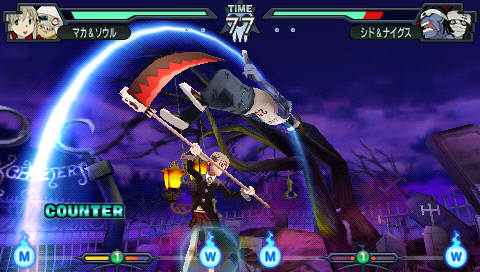
Soul Eater: Battle Resonance - Japan PSP


Soul Eater: Battle Ressonância é um jogo de luta da Namco Bandai publicou por jogos lançados em 27 de Janeiro de 2009 para o Sony PlayStation Portable.


Tamanho: 496 MB
Idioma: Japonês
Formato: ISO